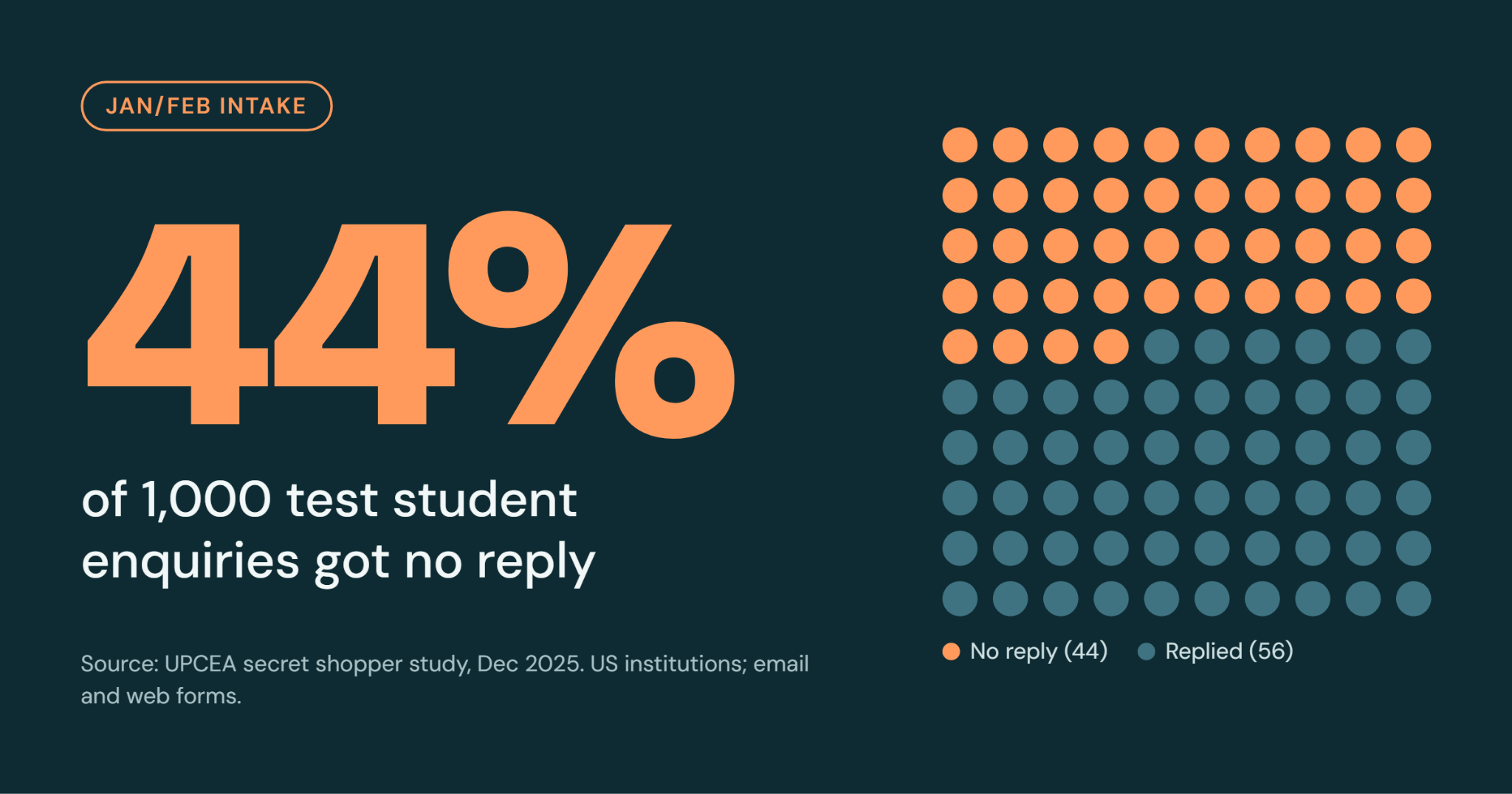
UPCEA, a US education association, sent 1,000 test enquiries to its member institutions in 2025. 44% got no reply. The test used email and web forms, not WhatsApp. But any admissions team can lose enquiries, especially when staff are flipping between tabs and wading through thousands of messages. The January and February intake is when it hurts most, because enrolment and fees questions all arrive at once. Here is how to do student enquiry management in four steps.
The short answer: student enquiry management means handling every question from prospective students in one organised way. Do it in four steps: save five replies, put every channel in one shared inbox, cover the hours you’re closed, and run a 10-minute check each month.
Step 1: Five reply templates for student enquiries
Two topics come up most: admission and enrolment, and fees. Write one reply for each, save it, and send it in one click. Fill in the [brackets].
Admission and enrolment:
- Entry requirements: “Hi! Thanks for asking about [programme]. You will need [requirements]. Want help checking if you qualify?”
- How to apply: “It’s easy: [step 1], [step 2], [step 3]. Start here: [link]. Which programme are you applying for?”
- Intake dates: “Our [January/February] intake for [programme] starts on [date]. Registration closes on [date]. Which intake suits you?”
Fees:
- Fees: “Fees for [programme] are [amount]. This covers [what is included]. Want the full breakdown?”
- Ways to pay: “You can pay by [options]. [Instalment details, if you offer them.] Shall I send you the steps?”
Two tips. End each reply with a question, so the chat keeps going. And put the fee and what it covers in one message, so you don’t get a second question straight after.
Step 2: Put WhatsApp and every other channel in one inbox
UPCEA found that enquiries sent to one staff member’s email got no reply 62% of the time. If that person is busy or away, nobody else sees the message. One person’s inbox is a risk: one busy day, and the enquiry is gone. UPCEA’s advice is to use one shared system instead. That is the most important rule of student enquiry management: one place for every message.
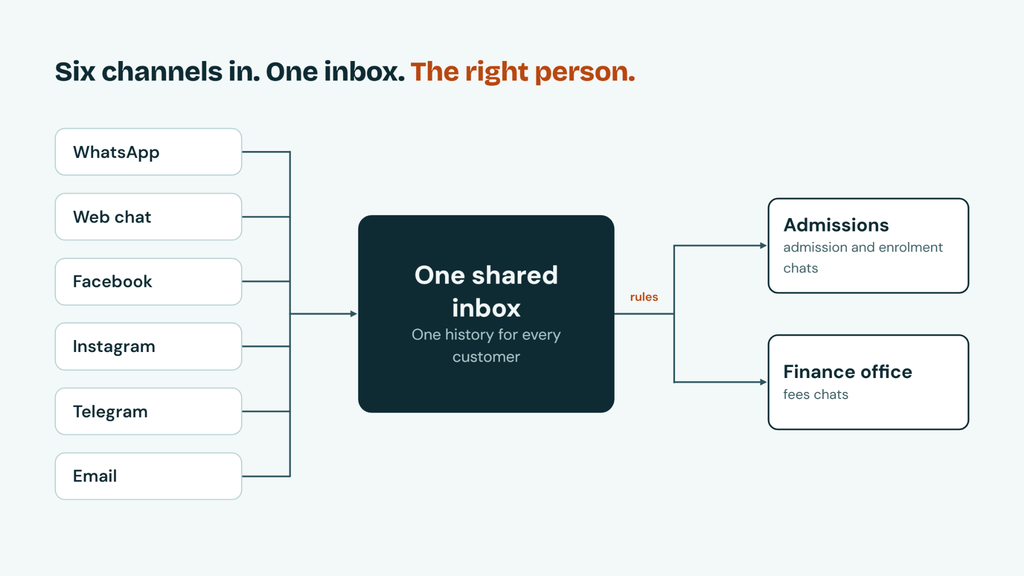
Orencloud’s OMNI puts WhatsApp, web chat, Facebook, Instagram, Telegram and email in one shared inbox. To set it up:
- List your channels. A channel left off the list stays outside the inbox.
- Pick an owner for each topic. For example, admissions takes admission and enrolment chats, and the finance office takes fees chats. Running several faculties? Give each team its own inbox.
- Add rules. A rule can send any chat that mentions “fees” to the right person. Add labels too, because they feed into OMNI’s reports.
We link your WhatsApp number through Meta’s official onboarding and guide you through the rest.
OMNI can also send broadcast messages. Use one to remind many students before registration closes for the January or February intake.
Step 3: Cover the hours you’re closed
Student enquiry management should not stop when your office closes. Nobody wants to answer fee questions at midnight. A bot will happily take the shift.
Cosine is our AI chatbot. It answers from your own documents, at any hour. If it is unsure, or the student asks for a person, it passes the chat on with the full history. Teach it your admission, enrolment and fees answers first.
Cosine is optional and costs extra. With OMNI, your bot can be ready in under three days. Try the demo bot.
Step 4: The 10-minute monthly check
Student enquiry management is not a one-off job. Rules stop working and replies go out of date. So check once a month. Do your first check before the January messages start, and again a week before the January and February intakes open.
- Send a test message through each channel. Note how long the first reply takes.
- Check that each chat reached the right person.
- Test after hours. Does the bot answer? Does the chat history carry over?
- Open OMNI’s reports. Compare first reply time and chats by channel.
- Update your saved replies. Fees and dates go out of date first.
Test your website enquiry form too. UPCEA’s testers found broken forms and error pages.
What student enquiry management with OMNI costs
OMNI starts at RM 275 a month for up to 5 users, with all inboxes included (prices checked October 2026). Bigger teams:
- Up to 10 users: RM 500 a month
- Up to 20 users: RM 900 a month
- Up to 30 users: RM 1,200 a month
- Then RM 35 per user a month
Meta’s WhatsApp message charges and the Cosine bot cost extra. Meta changed its charging rules on 1 October 2026, so check Meta’s pricing. See all plans on our pricing page.
Want to see OMNI with your own WhatsApp number? Get a quote or try the demo bot.
Frequently asked questions
Student enquiry management means handling every question from prospective students in one organised way: one inbox for all channels, an owner for each topic, saved replies and a regular check. It is how an admissions team makes sure no enquiry is missed.
A common reason is that a single person owns the inbox. In UPCEA’s 2025 test, enquiries sent to one staff member’s email got no reply 62% of the time. If that person is busy or away, nobody else sees the message. A shared inbox with an owner for each topic helps make sure someone always sees it.
ORENCloud’s OMNI puts WhatsApp, web chat, Facebook, Instagram, Telegram and email in one shared inbox. List your channels first, because a channel left off the list stays outside the inbox.
Plans start at RM 275 a month for up to 5 users, with all inboxes included. Meta’s WhatsApp charges and the Cosine bot cost extra.
Yes. Cosine answers common questions at any hour, using your own documents. It passes the chat to a person when it is unsure or the student asks. It is optional and costs extra.
Once a month, and the check takes about 10 minutes. Do the first one before the January messages start, and again a week before the January and February intakes open.
OMNI has two-factor sign-in, TLS encryption, and role-based access. Attachments are encrypted, and you can run OMNI in your own organisation or cloud.