
WhatsApp Business API and shared inbox in Malaysia: Every customer conversation in one shared inbox
OMNI brings WhatsApp, web chat, Facebook, Instagram, Telegram and email into one place. Your team answers faster, and the Cosine chatbot covers the hours you are closed.

OMNI is a WhatsApp Business API and shared inbox from ORENCloud for Malaysian and regional businesses. It brings WhatsApp, Facebook, Instagram, Telegram, email and web chat into one inbox, with the Cosine AI chatbot, reports and WhatsApp blasting with delivery reports. Plans start at RM 275 a month for up to 5 users. Meta’s message charges and AI charges are separate.
- Price
- From RM 275 a month for up to 5 users, by plan. All inboxes included
- Official Cloud API, no ORENCloud platform fee. Meta charges per message separately
- Partner status
- Certified Meta Tech Provider
See the OMNI WhatsApp inbox at work
Real OMNI screens with sample data: one shared inbox for WhatsApp, web chat, Facebook, Instagram and email, with routing rules and reports. All names and numbers are made up.
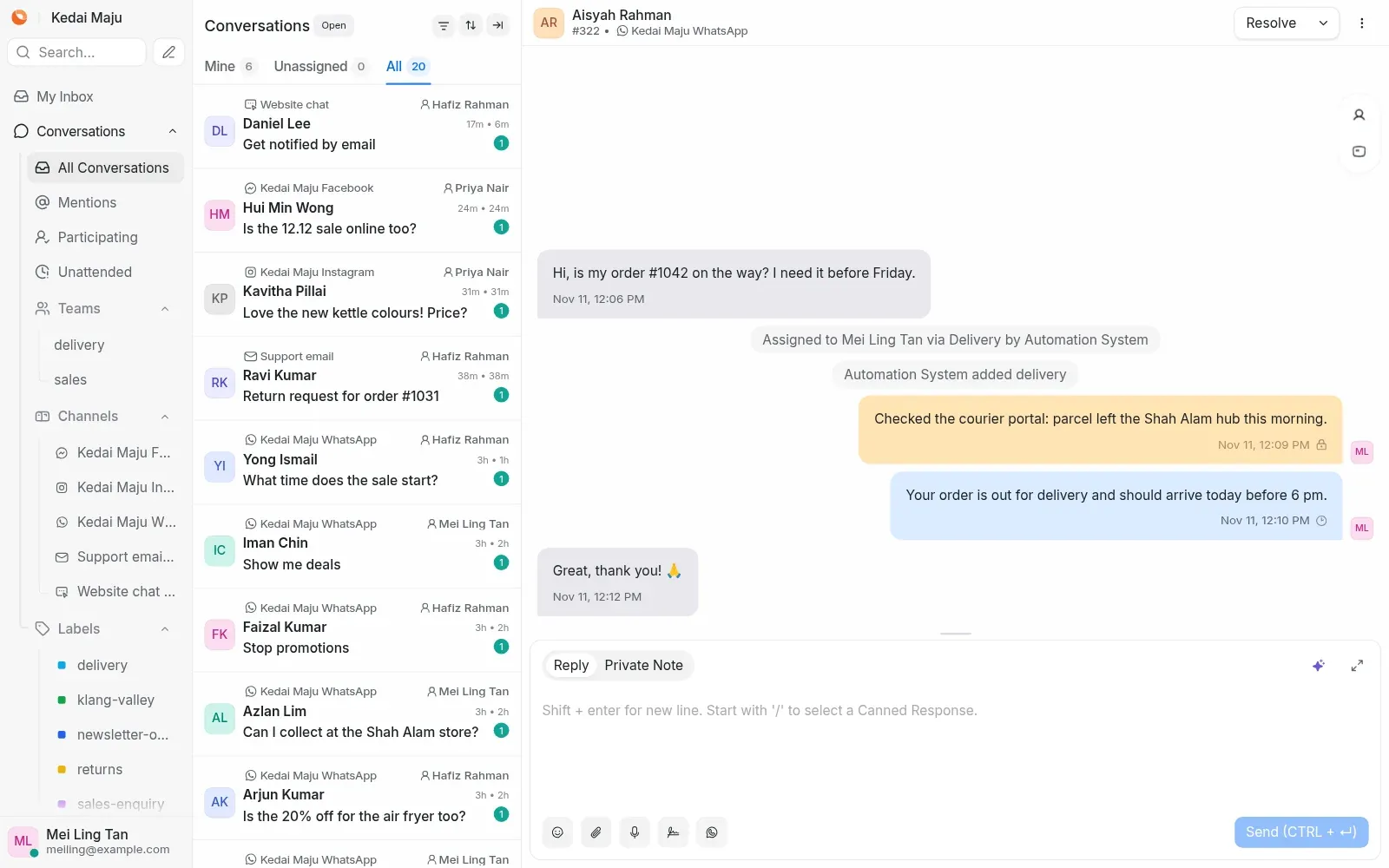
Real product screen with sample data.
Shared inbox: what you see
- WhatsApp, web chat, Facebook, Instagram and email chats land in one list, each marked with its channel and the agent who owns it.
- Routing rules assign each chat and add labels, and the chat history shows what the rule did.
- Agents leave private notes for colleagues and answer common questions with saved replies.
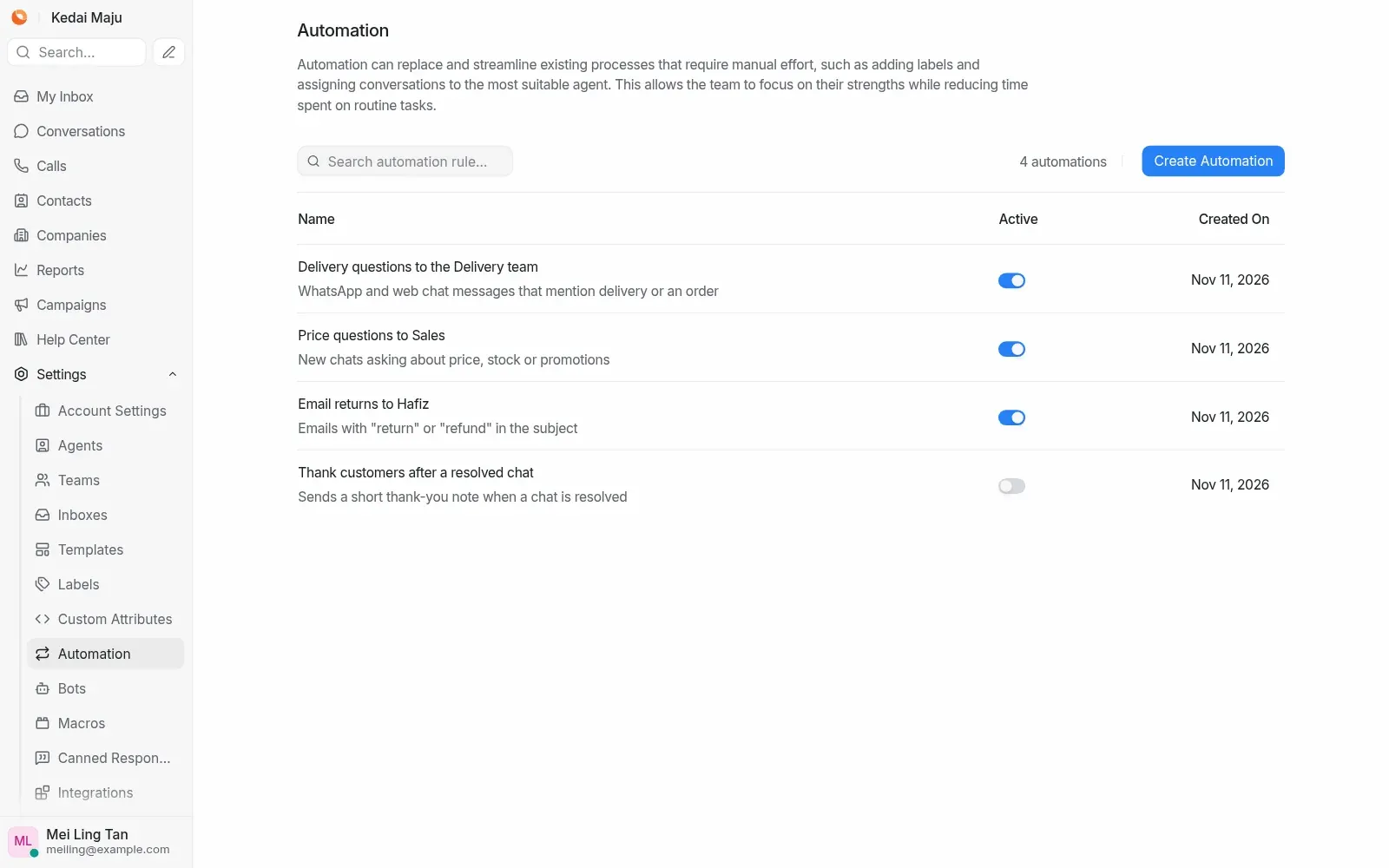
Real product screen with sample data.
Routing rules: what you see
- Automation rules act on new chats and messages: assign a team or an agent, add labels or send a message.
- Conditions can check the message text, the channel, the email subject and more.
- Switch a rule on or off without deleting it.
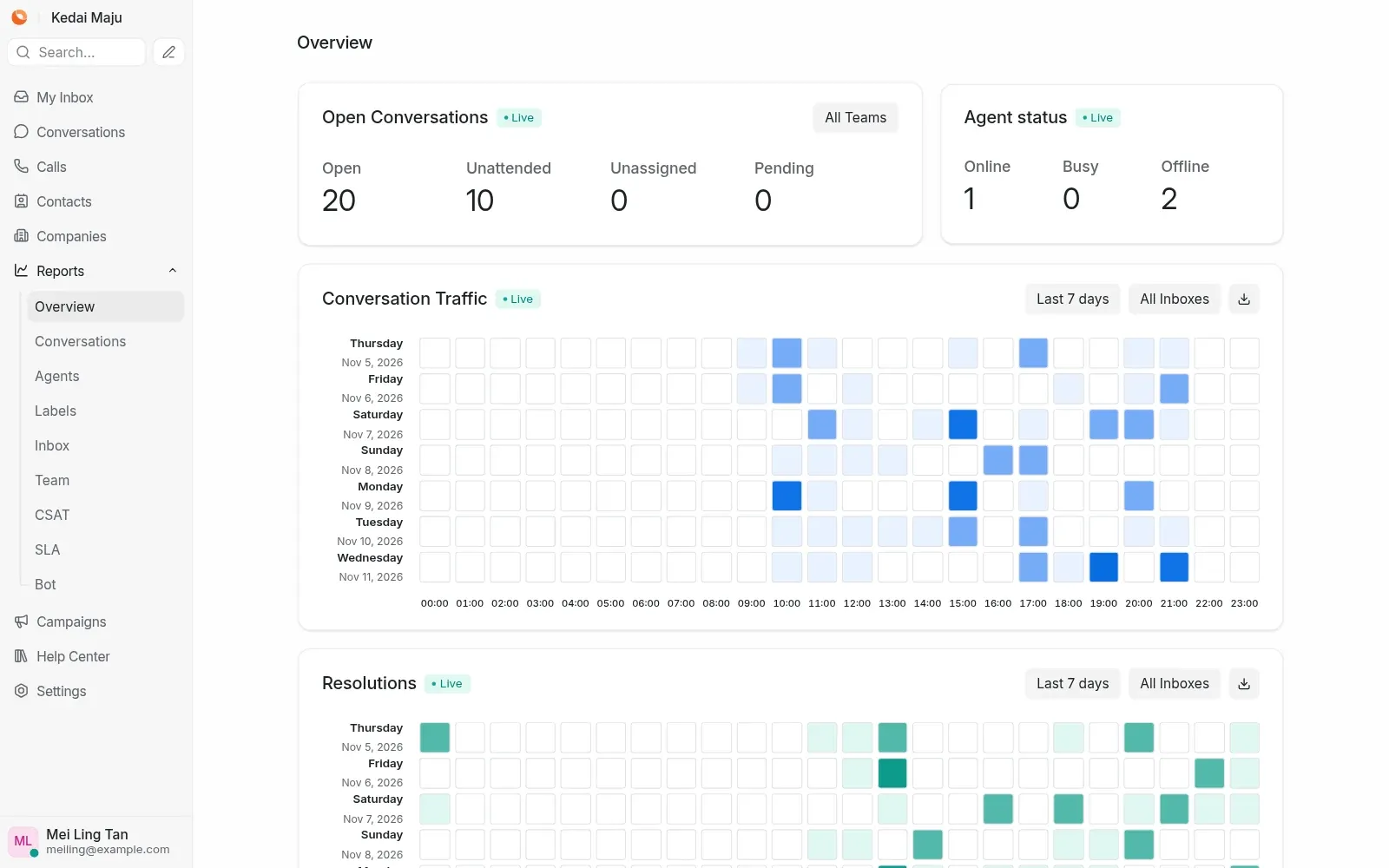
Real product screen with sample data.
Reports: what you see
- See open, unattended and unassigned chats and which agents are online, updated live.
- Heatmaps show when chats arrive and when they are resolved, by hour and day, for all inboxes or one.
- Further reports cover conversations, agents, labels, inboxes and teams, and you can download them.
Real product screen with sample data.
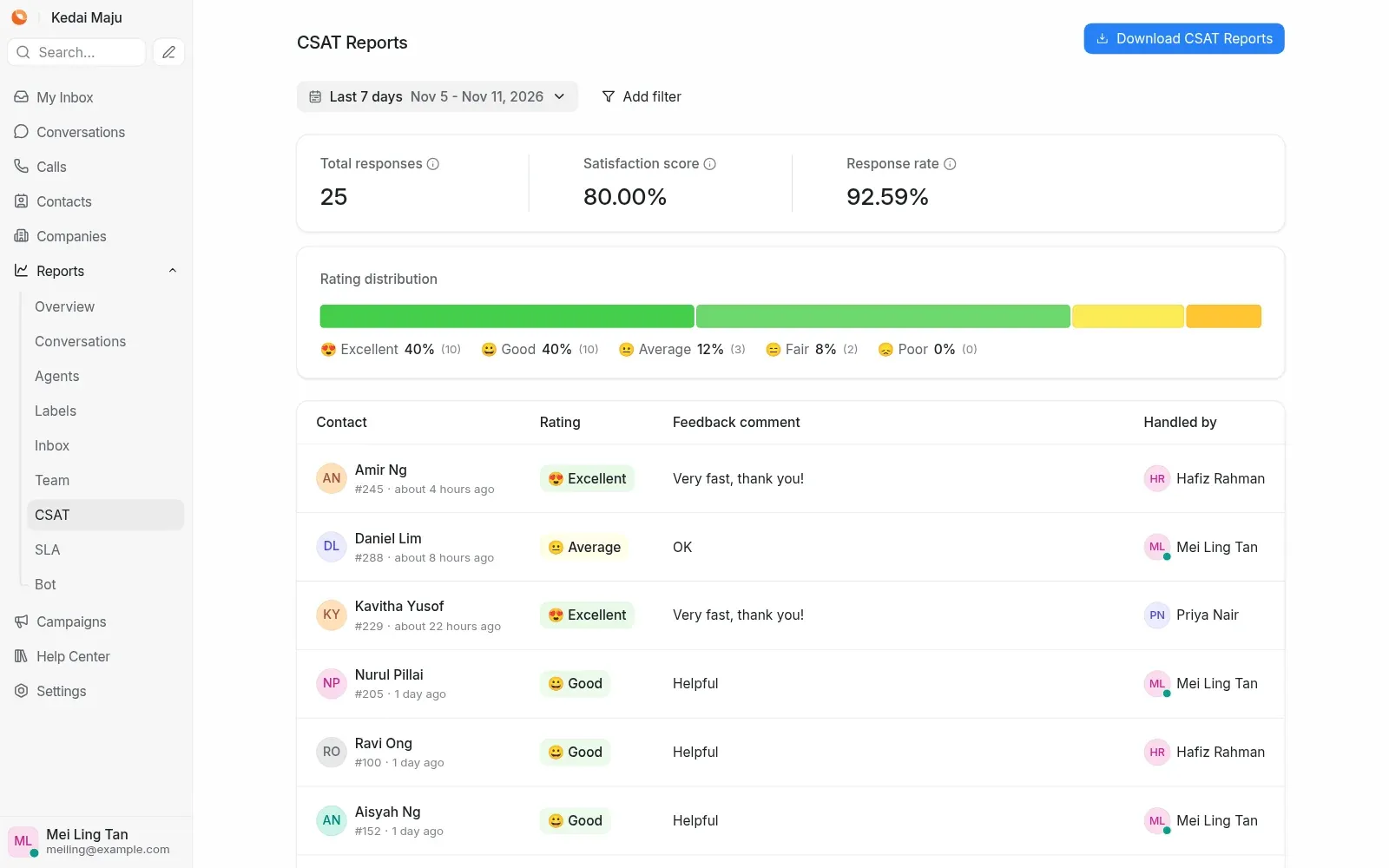
Customer satisfaction: what you see
- When you turn on the survey for an inbox, customers rate the chat once it is resolved and can add a comment.
- See the satisfaction score, response rate and spread of ratings for any date range, and download the report.
- Each response shows the customer, the rating, the comment and the agent who handled the chat.
WhatsApp blasting with delivery and read reports
Real OMNI screens with sample data: schedule an approved WhatsApp template for a labelled contact list, see which messages were delivered and read, and answer replies in the shared inbox. All names, numbers and results are made up.
Real product screen with sample data.
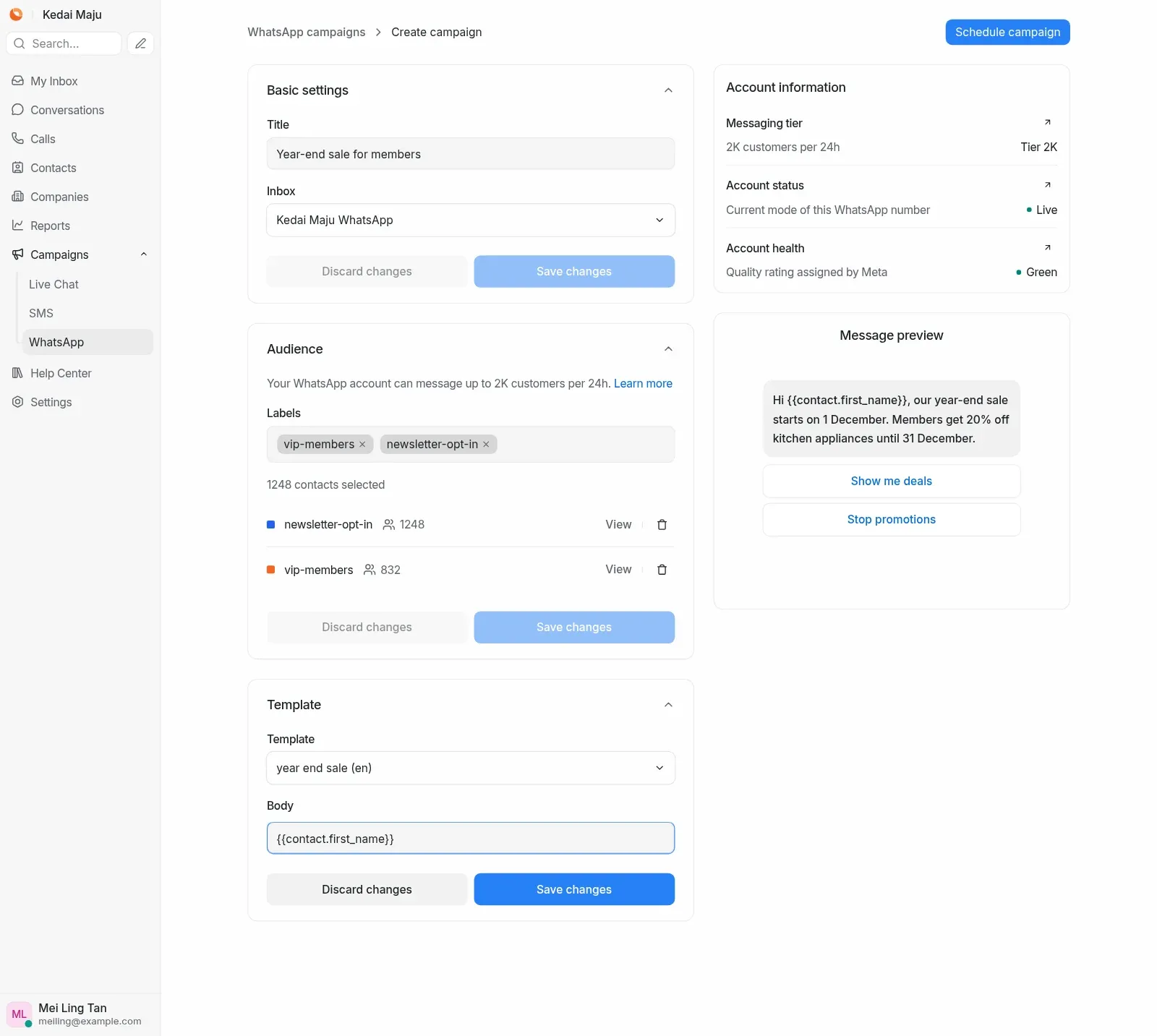
Create a blast: what you see
- Choose your WhatsApp number, pick the audience by contact labels such as opted-in members, and pick a message template that Meta has approved. With more than one label, everyone who has any of them is included.
- Personalise every message with the customer's name or other contact details, and check the preview, including quick-reply buttons.
- Before you send, the form shows your messaging limit, the number of unique customers you can message outside a chat in a moving 24 hours, and the quality rating Meta gives your number.
Real product screen with sample data.
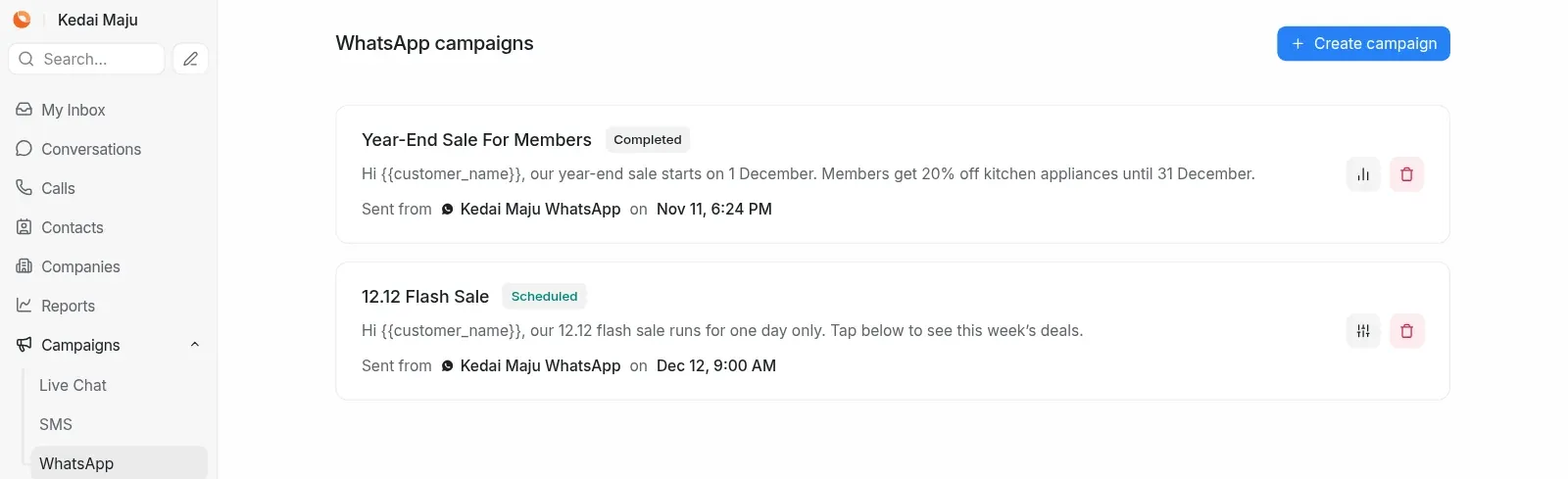
Scheduled blasts: what you see
- Choose when each WhatsApp blast starts sending, such as 9 am on 12.12.
- The list shows which blasts are scheduled and which are completed, and opens the delivery report once a blast starts sending.
Real product screen with sample data.
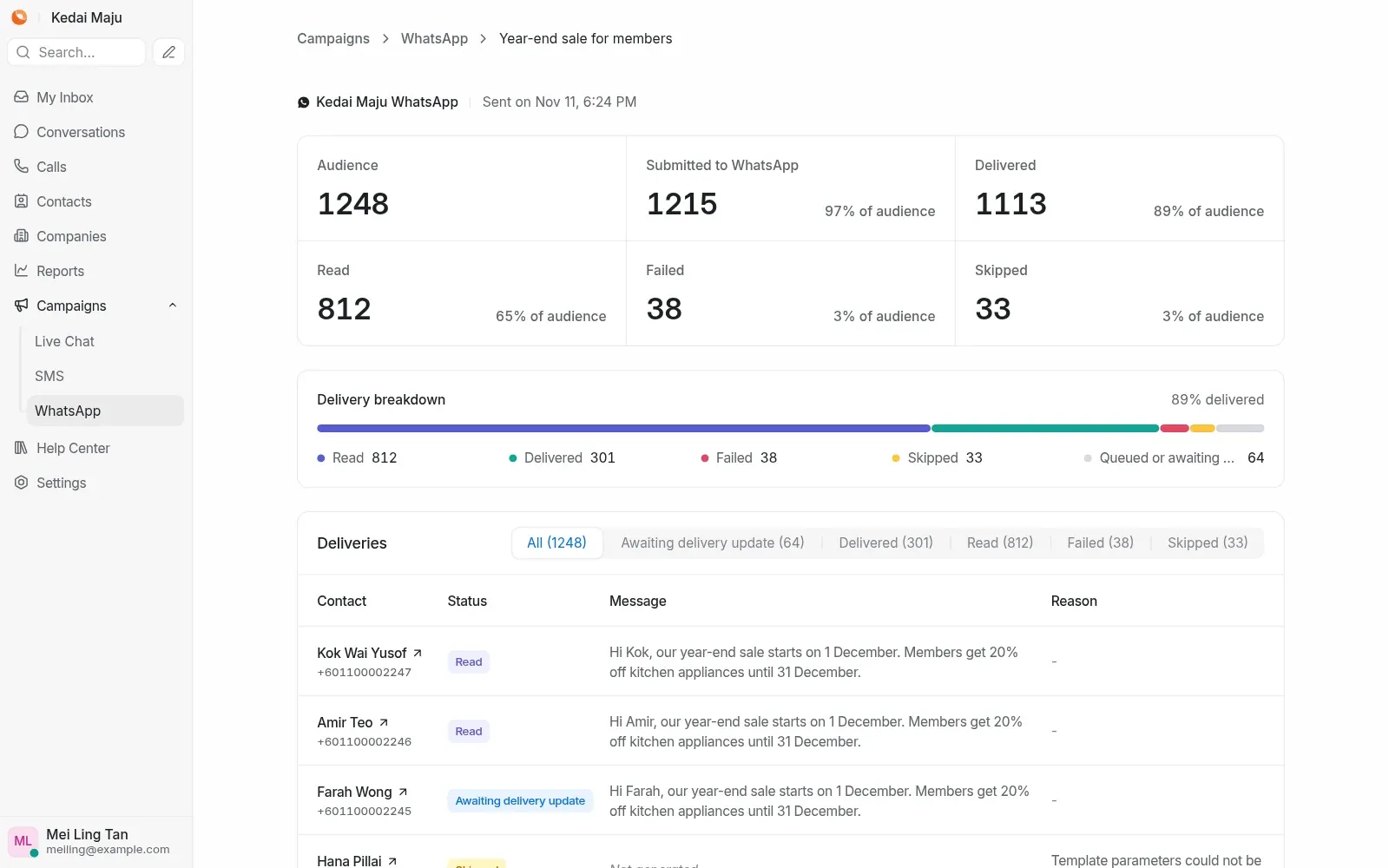
Delivery report: what you see
- See how many messages were submitted to WhatsApp, delivered, read, failed or skipped, as counts and as a share of the audience. Delivered includes messages that were read.
- Counts update as WhatsApp reports back, and the list shows every contact with their status and the personalised message text.
- Read status is only reported when customers have read receipts turned on.
Real product screen with sample data.
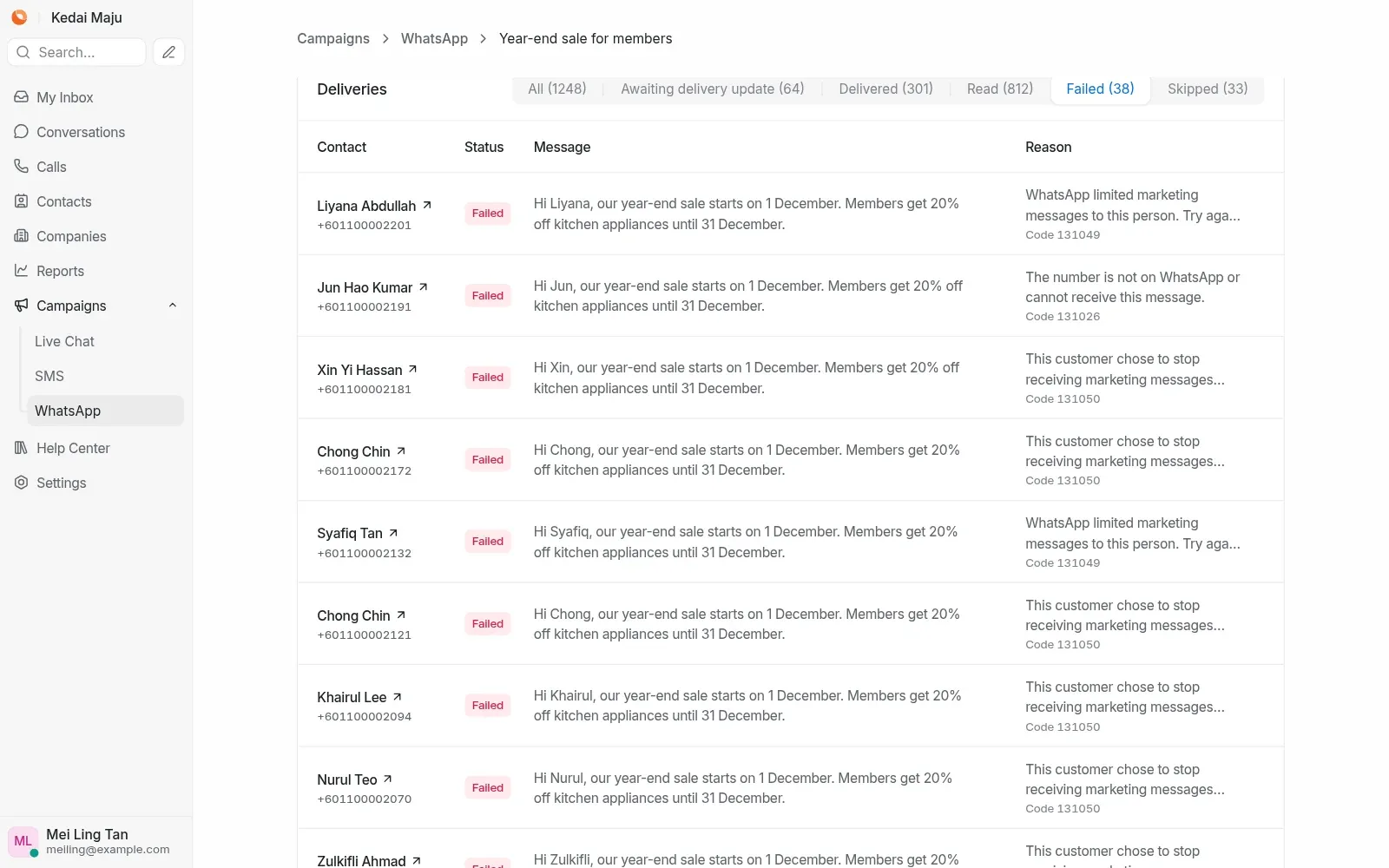
Failed messages: what you see
- Filter the report by status to see every failed or skipped message with the reason, and WhatsApp's error code for failed messages.
- Reasons can include a number that is not on WhatsApp, WhatsApp limiting how many marketing messages one person receives, and customers who stopped marketing messages from your business.
Real product screen with sample data.
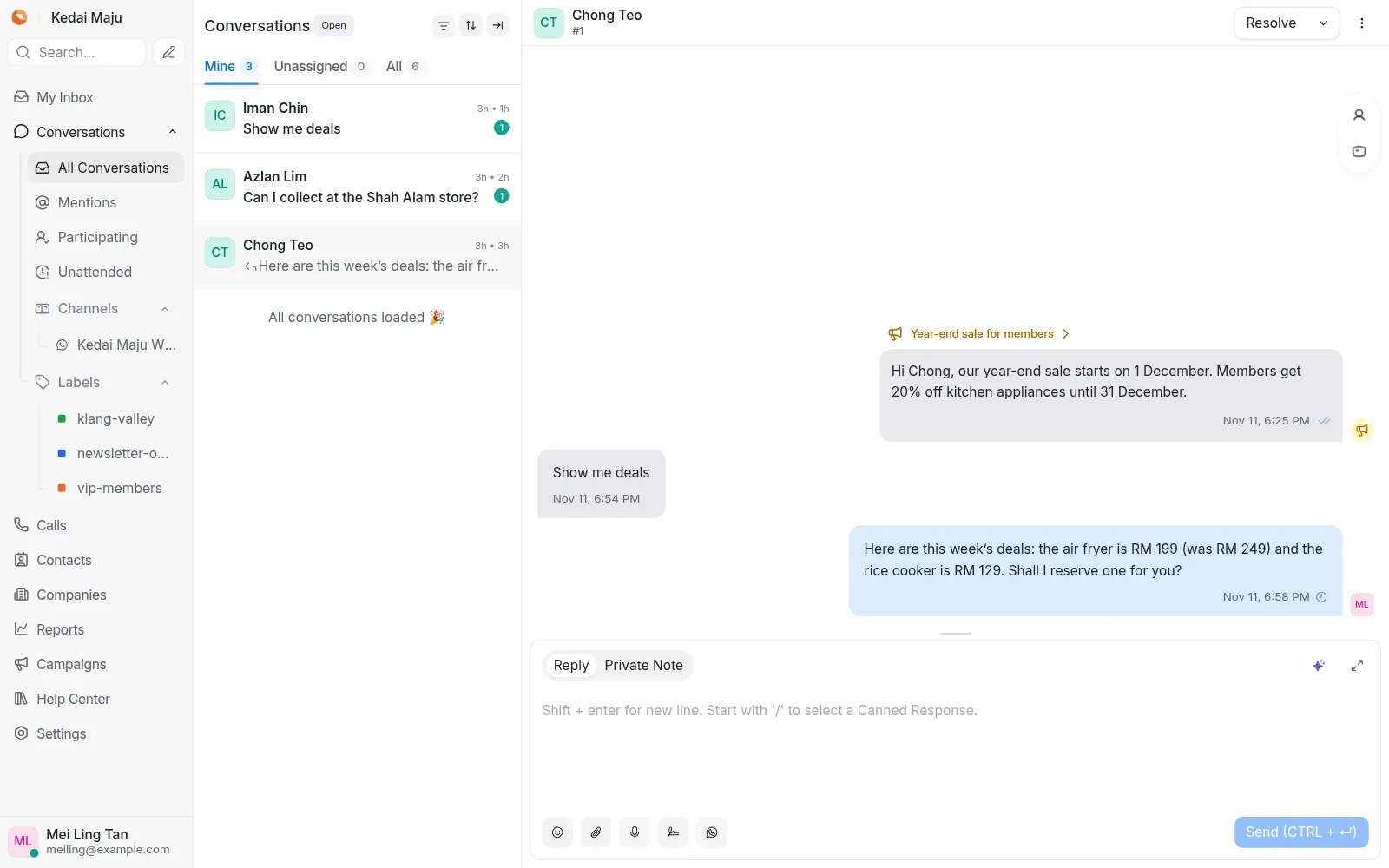
Replies in the inbox: what you see
- When a customer replies to a blast, the chat lands in the shared inbox with the campaign message above it, so the agent knows what the customer is answering.
- Your routing rules decide who picks it up, and the agent answers within WhatsApp's 24-hour customer service window.
WhatsApp blasting the official way
Bulk WhatsApp marketing on the official API, with a report on what happened to every message.
Ask us about the WhatsApp blasting add-on for your OMNI plan.
Approved templates on the official API
Every blast uses a message template approved by Meta and goes out through the official WhatsApp Cloud API. Unofficial bulk-sending apps break WhatsApp's terms and can get a number banned.
Send only to people who opted in
Meta requires customers to opt in to messages from your business, and the opt-in must name your business. Import contacts from a CSV file and label the ones who agreed.
Daily limits that grow with you
Meta limits how many unique customers a business can message outside a chat in a moving 24 hours. A new business portfolio starts at 250, and Meta can raise it to 2,000, 10,000, 100,000 and unlimited based on business verification, how much of the limit you use and message quality. All numbers in the portfolio share the limit.
Reports for every blast
See how many messages were submitted, delivered, read, failed or skipped, with the reason for each one that did not go through, and answer replies in the shared inbox.
Respect opt-outs
Under Malaysia's Personal Data Protection Act 2010, customers can tell you to stop direct marketing. Add a quick-reply button such as "Stop promotions", and remove anyone who uses it from every marketing label.
How a conversation moves through OMNI
Pick a channel and send a test message.
Send a test message from
WhatsApp conversation
What changes for your team
All channels, one inbox
WhatsApp, web chat, Facebook, Instagram and email in one place. Every customer has one history.
Faster answers
Quick replies, the Cosine AI chatbot and internal notes help agents solve issues sooner.
Reports you can use
See team performance, satisfaction and volume by channel. Download any report.
Open around the clock
Cosine answers common questions at night and on holidays, then passes the chat to a person when needed.
The official WhatsApp Cloud API, without a middleman
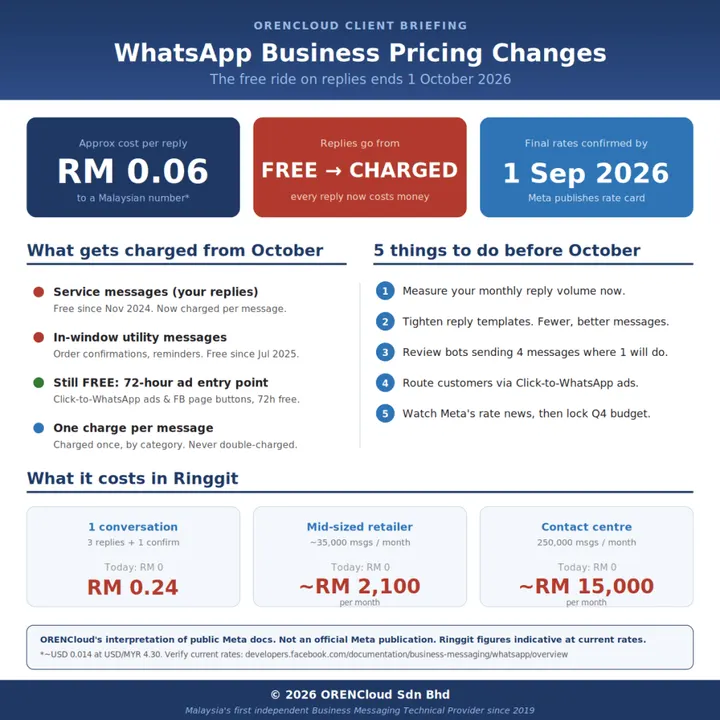
ORENCloud is a certified Meta Tech Provider. We onboard your WhatsApp Business account ourselves, with no extra monthly ORENCloud platform fee. Messaging is not free: Meta charges per message delivered. Its rules changed on 1 October 2026, so check Meta’s pricing. See also our WhatsApp Business API setup guide.
WhatsApp onboarding links
Start WhatsApp Business onboarding
Connect your business and phone number through Meta's official sign-up.
Update your WhatsApp business profile
Change the photo, description, address and website customers see.
Everything in OMNI
Chatbots and private hosting are optional services.
WhatsApp blasting
- Scheduled campaigns
- Send an approved template to contacts by label, personalised for each customer, starting at the time you choose. An add-on, priced on request.
- Delivery and read reports
- Submitted, delivered, read, failed and skipped counts, plus a status for every contact and the reason when a message did not go through.
Channels and media
- Popular channels
- WhatsApp, Telegram, Messenger, Instagram, email and web chat, plus any platform that can send webhooks.
- Rich media
- Send and receive images, voice notes, video and locations. Some channels have limits.
Routing and automation
- Automatic routing
- Share chats across agents and escalate to another team. Labels feed your reports.
- Rules and macros
- Act on keywords or inbox, and run repeat actions in one click.
- Canned replies and surveys
- Save standard answers and ask customers to rate chats.
- Chatbots
- Add a multilingual bot on supported channels. Bots are an optional managed service.
Tools inside the inbox
- Your web apps beside the chat
- Open your CRM or ticketing system inside the conversation screen.
- ChatGPT assistance
- Suggested replies and summaries. Needs your own paid OpenAI API key.
- Slack, API and webhooks
- Reply from Slack, or send messages and status changes to your other systems.
Control and security
- Private setup
- Run OMNI in your own organisation or cloud.
- Account protection
- Two-factor sign-in, encrypted connections and role-based access.
- Protected storage
- Attachments are encrypted in Amazon S3, behind Cloudflare's firewall and bot protection.
Going live with OMNI
Tell us what you need
Share your channels and team size. We suggest a setup and confirm the price.
Connect your channels
We link your WhatsApp number through Meta's official onboarding, plus Facebook, Instagram, email and web chat.
Set up your teams
Create inboxes, labels and routing rules. We guide you.
Add Cosine and go live
Train the Cosine bot on your own information. With OMNI it is usually ready in under three days.
Three separate costs
- OMNI subscription
- From RM 275 a month for up to 5 users, by plan. See the plans. WhatsApp blasting is an add-on, priced on request.
- Meta WhatsApp charges
- Billed per message delivered at Meta’s current rate card. See Meta’s pricing.
- AI charges
- Cosine is priced separately. ChatGPT assistance uses your own OpenAI API key. See Cosine.
Terms are in the glossary.
From RM 275 a month for up to 5 users
All inboxes and channels included. Prices checked October 2026.
Questions customers ask
What is OMNI?
OMNI is an omnichannel customer engagement platform. It puts WhatsApp, Facebook, Instagram, Telegram, email and web chat in one shared inbox, with chatbots, automation, reports and APIs.
How much does OMNI cost?
OMNI is priced by plan, not per user: RM 275 a month for up to 5 users, RM 500 a month for up to 10 users, RM 900 a month for up to 20 users, RM 1,200 a month for up to 30 users and RM 35 per user a month for more than 30 users. Fewer users than a plan allows does not lower its price. All inboxes are included. Meta charges for WhatsApp messages separately, and the Cosine AI chatbot is priced separately. See OMNI pricing.
What does Meta charge for WhatsApp messages?
Meta charges per message delivered, by message category and the recipient's market. Its charging rules changed on 1 October 2026, including for replies inside the 24-hour customer service window. Check the current rate card on Meta's WhatsApp Business Platform pricing page. These charges are on top of the OMNI subscription.
Can OMNI send WhatsApp blasts?
Yes. OMNI sends WhatsApp blasts, also called campaigns or broadcasts, through the official WhatsApp Cloud API. Choose a template approved by Meta and an audience by contact label, personalise each message, and choose when it starts sending. A delivery report then shows the status of every message. WhatsApp blasting is an OMNI add-on, priced on request.
Can I see who received and read my WhatsApp blast?
Yes. Each blast has a report with the audience and the messages submitted to WhatsApp, delivered, read, failed and skipped, plus a list of every contact with their status and the reason when a message did not go through. Counts update as WhatsApp reports back, and read status is only reported when customers have read receipts turned on.
How many customers can I reach with a WhatsApp blast?
Meta sets a messaging limit: the number of unique customers a business can message outside a chat in a moving 24 hours, shared by all its numbers. A new business portfolio starts at 250, and Meta can raise it to 2,000, 10,000, 100,000 and unlimited based on business verification, how much of the limit you use and message quality. WhatsApp also limits how many marketing messages one person receives from all businesses, so some messages can fail with error 131049.
Is WhatsApp blasting legal in Malaysia?
Sending marketing messages through the official WhatsApp Business Platform is allowed when you follow Meta's rules and Malaysian law. Meta requires customers to opt in to messages from your business. The Personal Data Protection Act 2010 generally requires consent to process personal data and lets customers tell you to stop direct marketing. This is general information, not legal advice.
Will my WhatsApp number be banned for blasting?
Unofficial bulk-sending apps break WhatsApp's terms, and WhatsApp bans accounts that use them. OMNI uses the official Cloud API with approved templates. Meta still rates your templates and number on quality: if many customers block or report you, Meta can pause templates or restrict sending. Message only people who opted in.
How much does WhatsApp blasting cost?
WhatsApp blasting is an OMNI add-on, quoted with your plan. Meta charges separately for delivered marketing messages at its rate for the recipient's country, with some exceptions, and Meta's volume discounts do not apply to marketing messages. See Meta's WhatsApp pricing.
How do I get started with the WhatsApp Business API?
ORENCloud is a certified Meta Tech Provider. We onboard your WhatsApp Business account through Meta's official flow. Read the WhatsApp Business API setup guide.
Can OMNI answer customers with AI?
Yes. The Cosine AI chatbot answers common questions around the clock and hands the chat to a person when needed. OMNI also offers ChatGPT-assisted replies if you supply your own OpenAI API key. See Cosine.
Is OMNI secure?
OMNI has two-factor sign-in, TLS encryption and role-based access. Attachments are encrypted at rest in Amazon S3. The service sits behind Cloudflare's firewall and bot protection. You can also run it in your own cloud.

Bring your customer chats into one place
Tell us which channels you use. We will show OMNI with your own WhatsApp number and price it for your team.