
Call center software in Malaysia: A cloud contact center for inbound, outbound or both
Queues, dialers, live wallboards and AI analytics in one cloud platform, priced for teams of any size.

ORENCloud Cloud Contact Center is call center software for inbound, outbound and blended teams in Malaysia, Singapore, Thailand and Indonesia. It includes ACD, call recording and live wallboards, plus AI-enabled analytics and an AI Business Dashboard. Gold for inbound is RM 76 per agent a month; Platinum, with predictive and preview dialing and sentiment analysis, is RM 255.
Annual promotion until 16 March 2027
Contact centre annual offer: 12 months for the price of 10
Subscribe annually with Saloma AI Receptionist: pay 10 months, get 12, and the RM 999 AI Receptionist onboarding fee is waived.
International BPOs Teleperformance, Webhelp, TDCX and Sellbytel use our contact center platform.















Also trusted by the Ministry of Health Malaysia, JPJ, Hospital Pusrawi, Meditop, Payquik, WSG, io3, CIMA and TMT.
See the cloud contact centre at work
Real screens from OCDial Neo, the call centre software behind ORENCloud Contact Center, showing what agents and supervisors see. The names and numbers are made up.
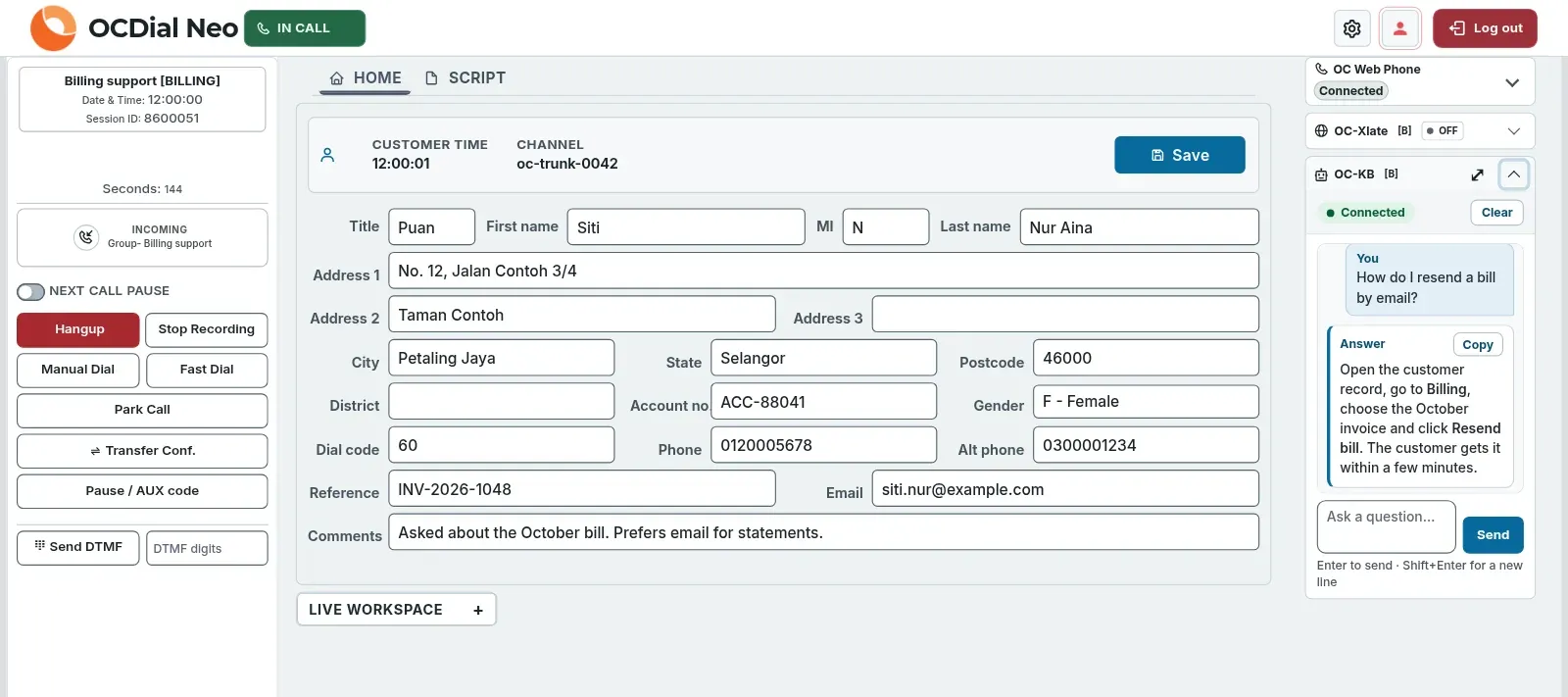
Real product screen with sample data.
Agent screen: what you see
- Automatic call distribution (ACD) sends each waiting call to the right agent, with skills-based routing on Platinum. The customer record opens with the call, and agents update it without leaving the agent desktop.
- Agents take calls in the browser with a headset, using the built-in WebRTC web phone. No desk phone needed.
- Call controls sit on the left: hang up, record the call, park, transfer, and pause with a reason code.
- CoPilot, the AI assistant on the right, suggests answers from your own campaign documents during the call.
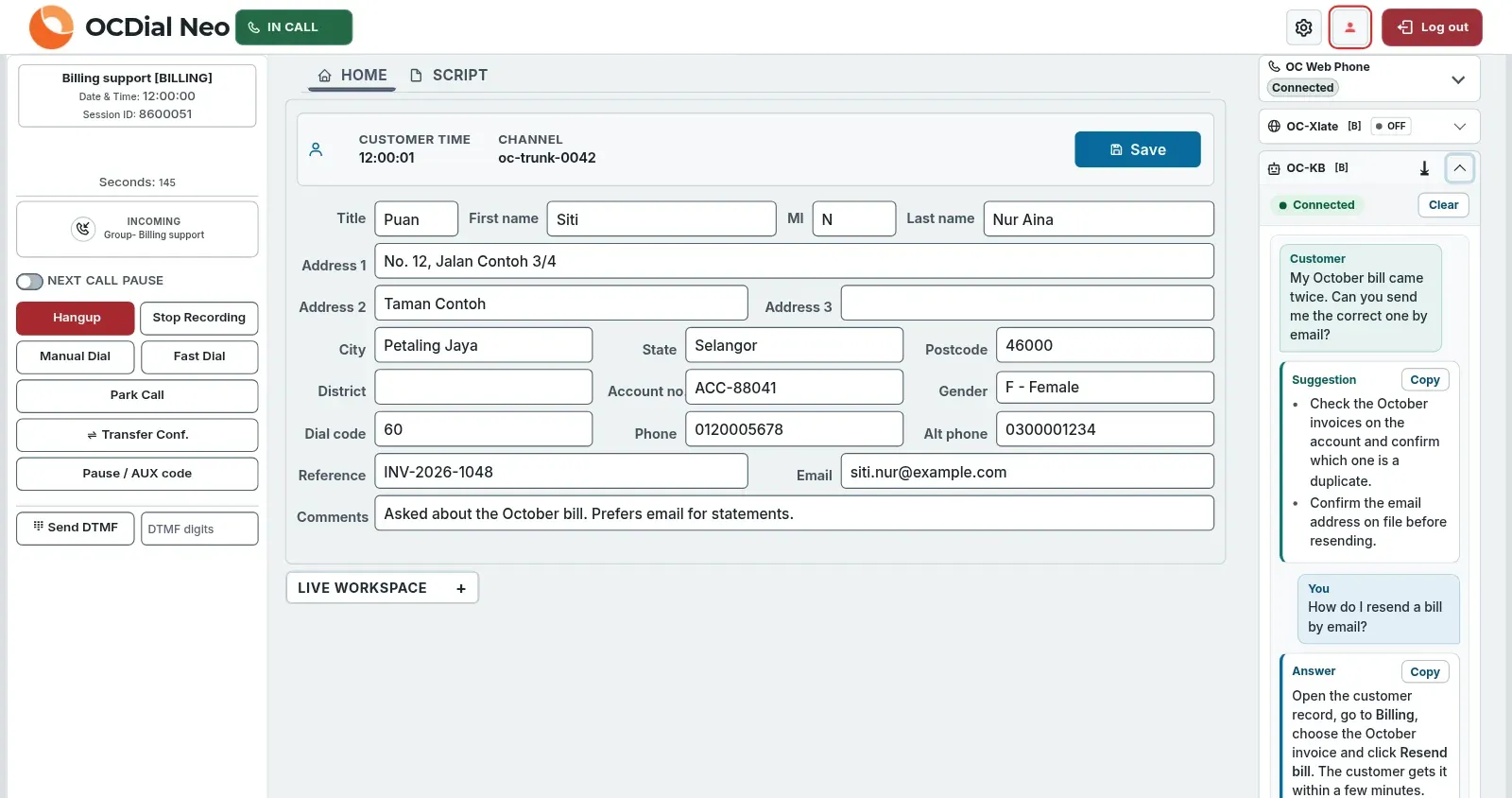
Real product screen with sample data.
AI agent assist: what you see
- CoPilot follows the customer through live transcription and suggests what to check or say next, drawn from your own campaign knowledge base.
- Agents can also type a question and get an answer card. Each answer and suggestion has a Copy button.
- Before any text goes to the AI, CoPilot redacts detected personal data from it, such as names, MyKad numbers and phone numbers. AI answers can be wrong, so agents should check critical information.
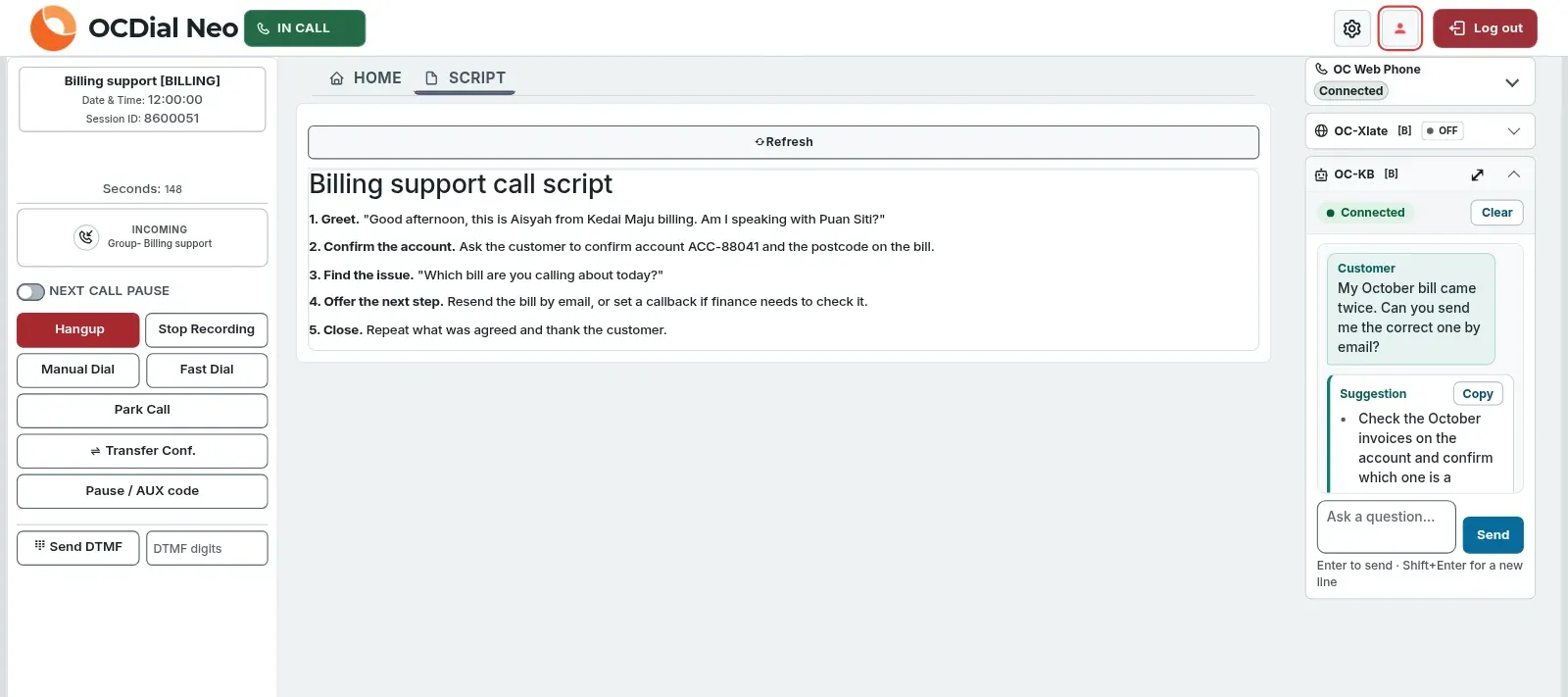
Real product screen with sample data.
Call script: what you see
- On Platinum, a call centre script guides each conversation, so every caller gets the same good answer.
- The script opens in its own tab, and the call controls stay in view.
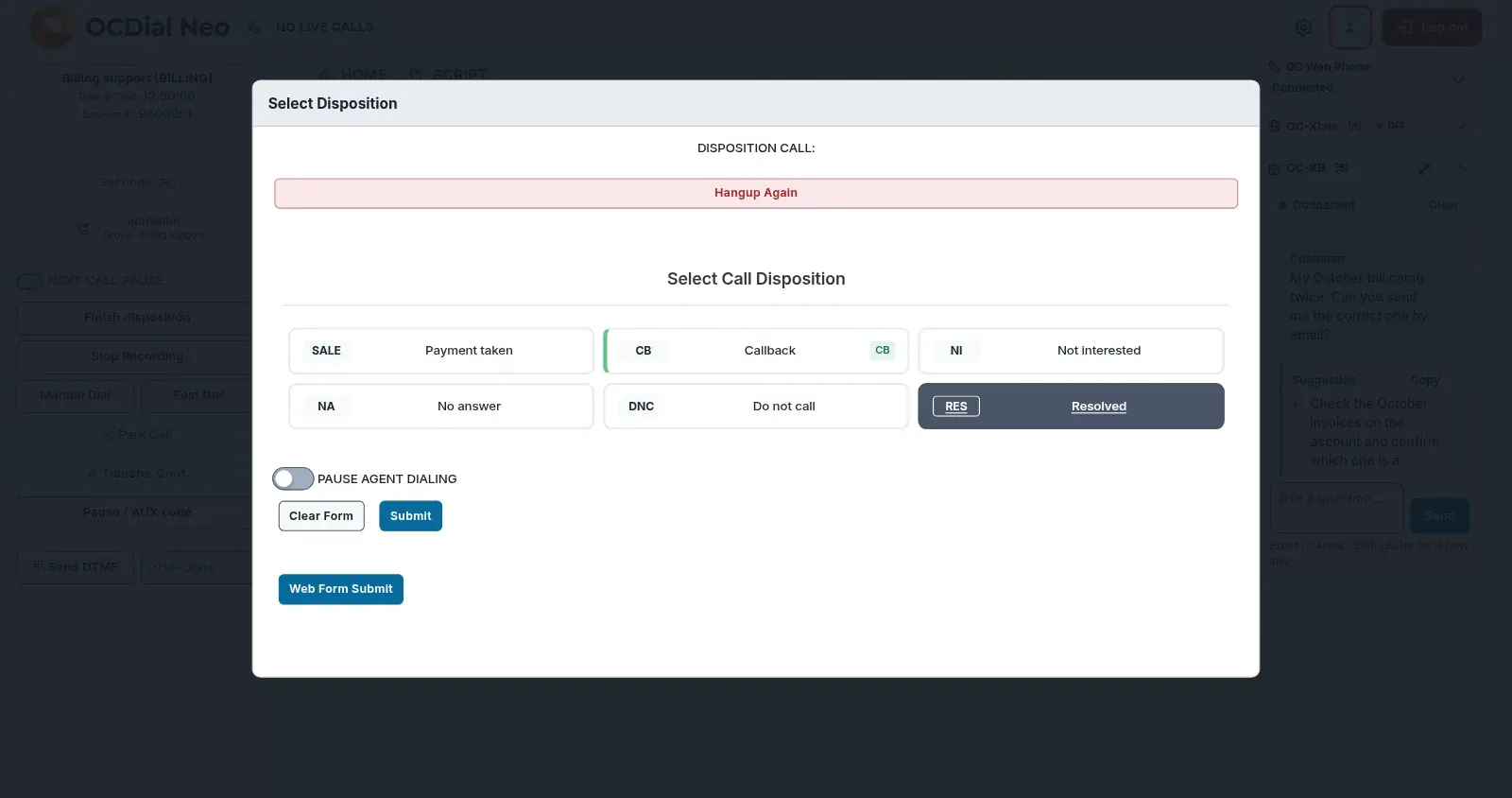
Real product screen with sample data.
Call outcome: what you see
- After each call the agent picks an outcome, known as a call disposition, such as callback or resolved. Your campaign sets the list.
- A switch pauses dialling after this call, so the agent can take a break before the next one arrives.
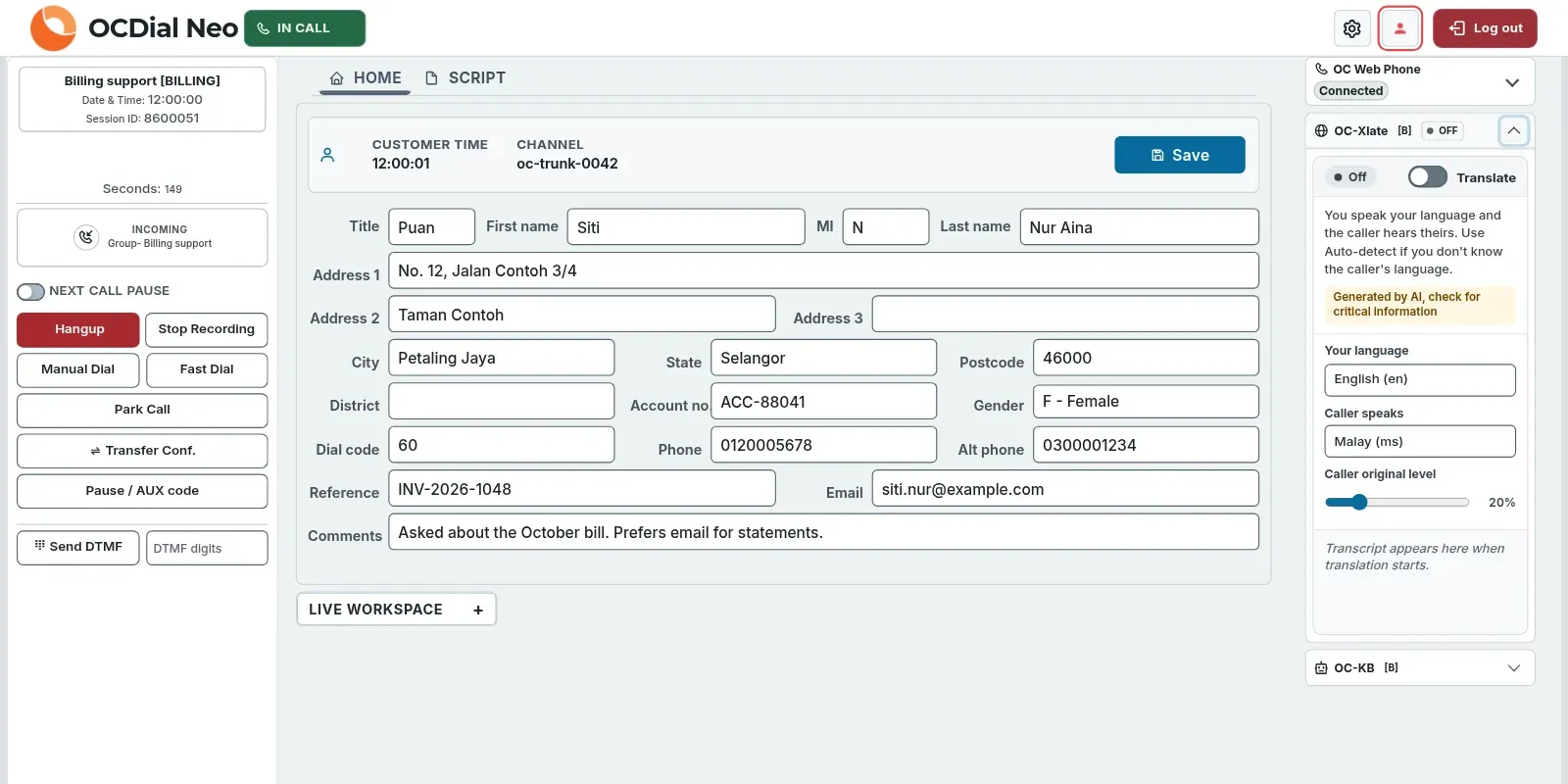
Real product screen with sample data.
Live translation: what you see
- With live call translation, the agent and the caller each speak their own language, for example English and Malay, and hear the other translated by AI.
- Agents choose their language and the caller's, or use auto-detect when the caller's language is unknown. The panel reminds them that translation is generated by AI, so they should check critical information.
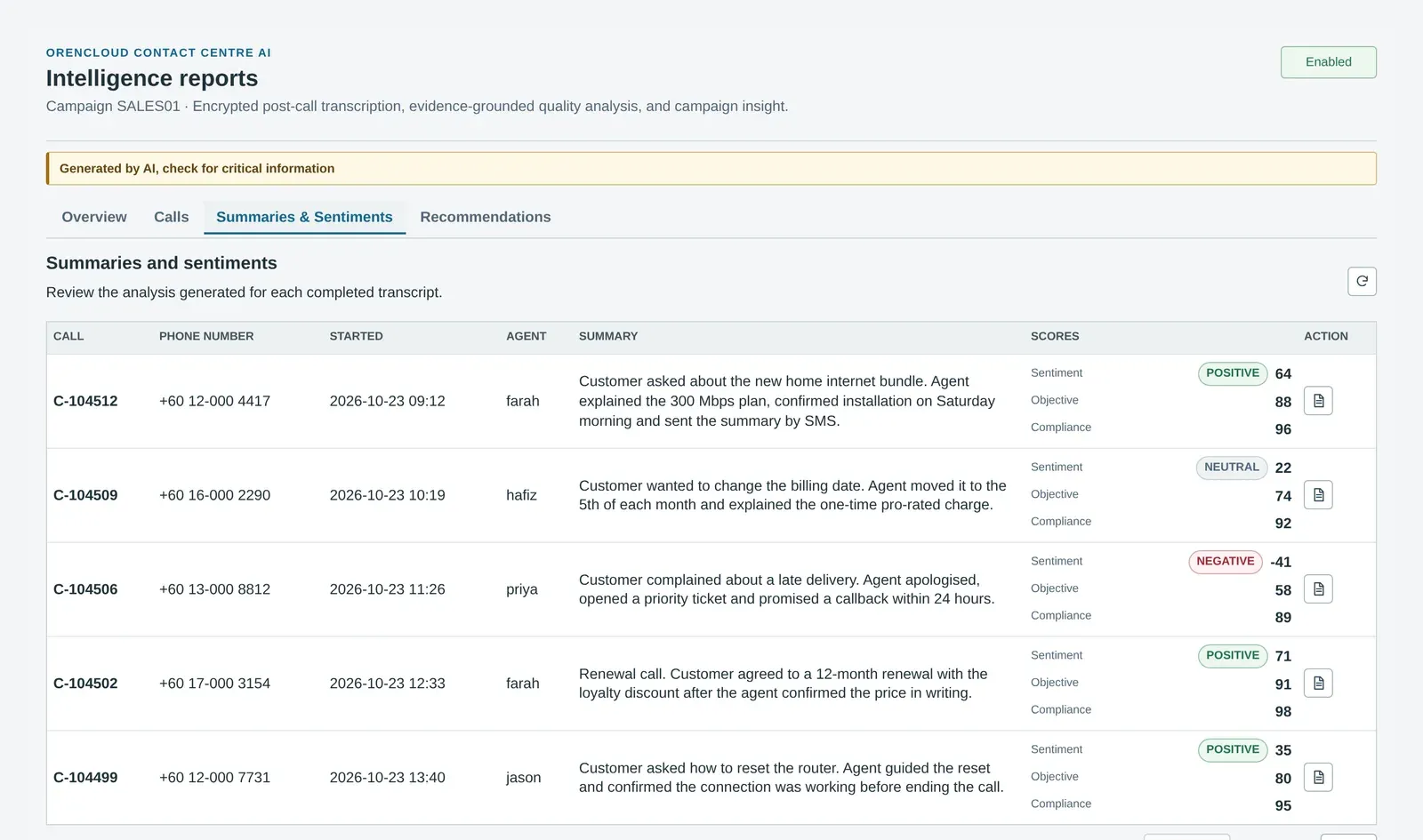
Real product screen with sample data.
AI call summaries: what you see
- When post-call analysis is enabled, selected eligible recordings can receive a short AI summary and supported assessments, subject to duration and usage limits, so supervisors know what happened without listening to every recording.
- Available assessments include campaign objectives and compliance, plus customer sentiment on Platinum, so you can find the calls that need attention; results can be unclear or unavailable.
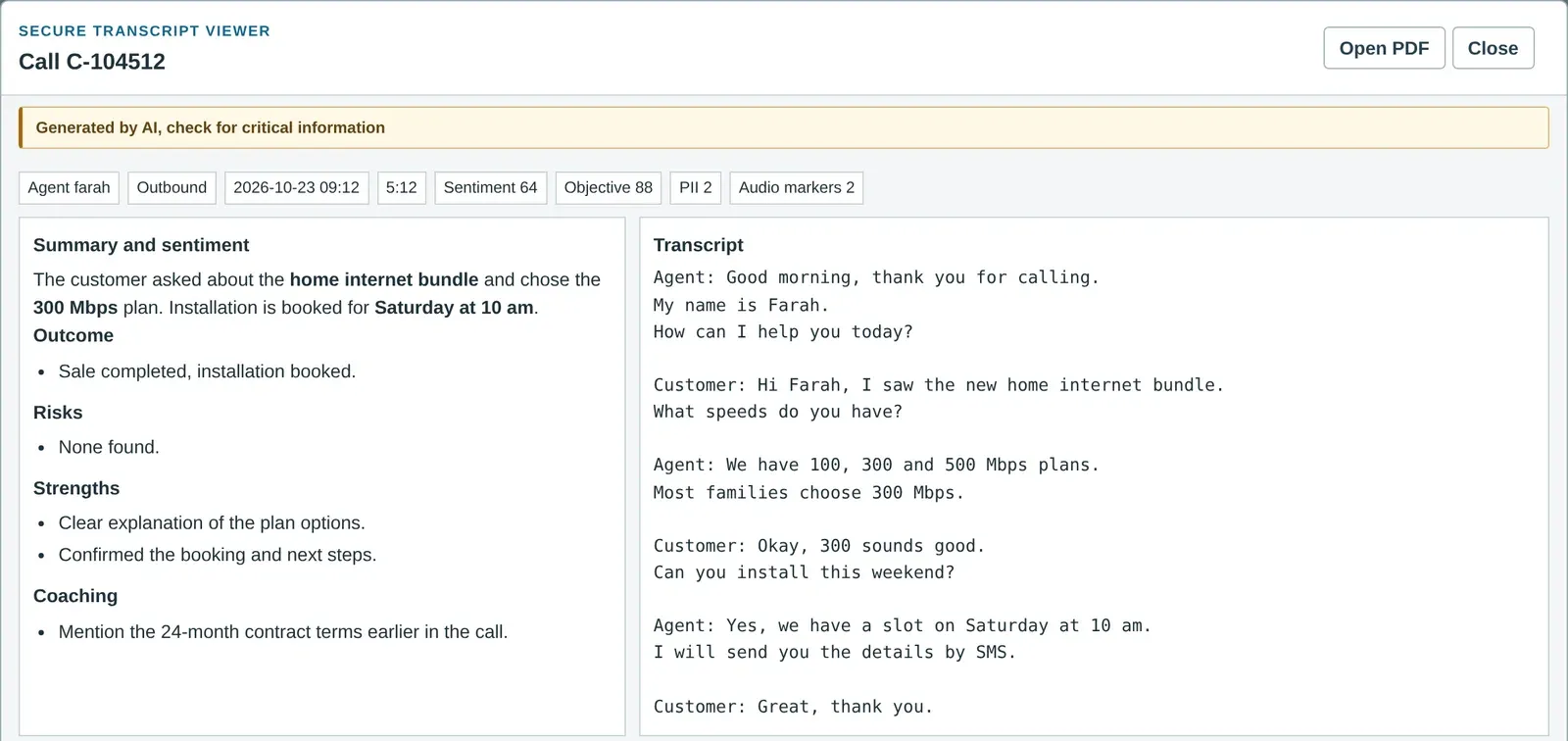
Real product screen with sample data.
Transcript and coaching: what you see
- Open any call to read the transcript next to the outcome, risks, agent strengths and coaching points.
- Search the call or ask a question about it, and export it as a PDF. With personal data redaction on for the campaign (the default), detected personal data is redacted before the AI analyses or exports it.
Call centre sentiment analysis, live and after the call
On Platinum, OC-Sen reads customer sentiment during the call, and OC-Intel explains it afterwards, with supporting quotes from the transcript. Real product screens; the names and numbers are made up.
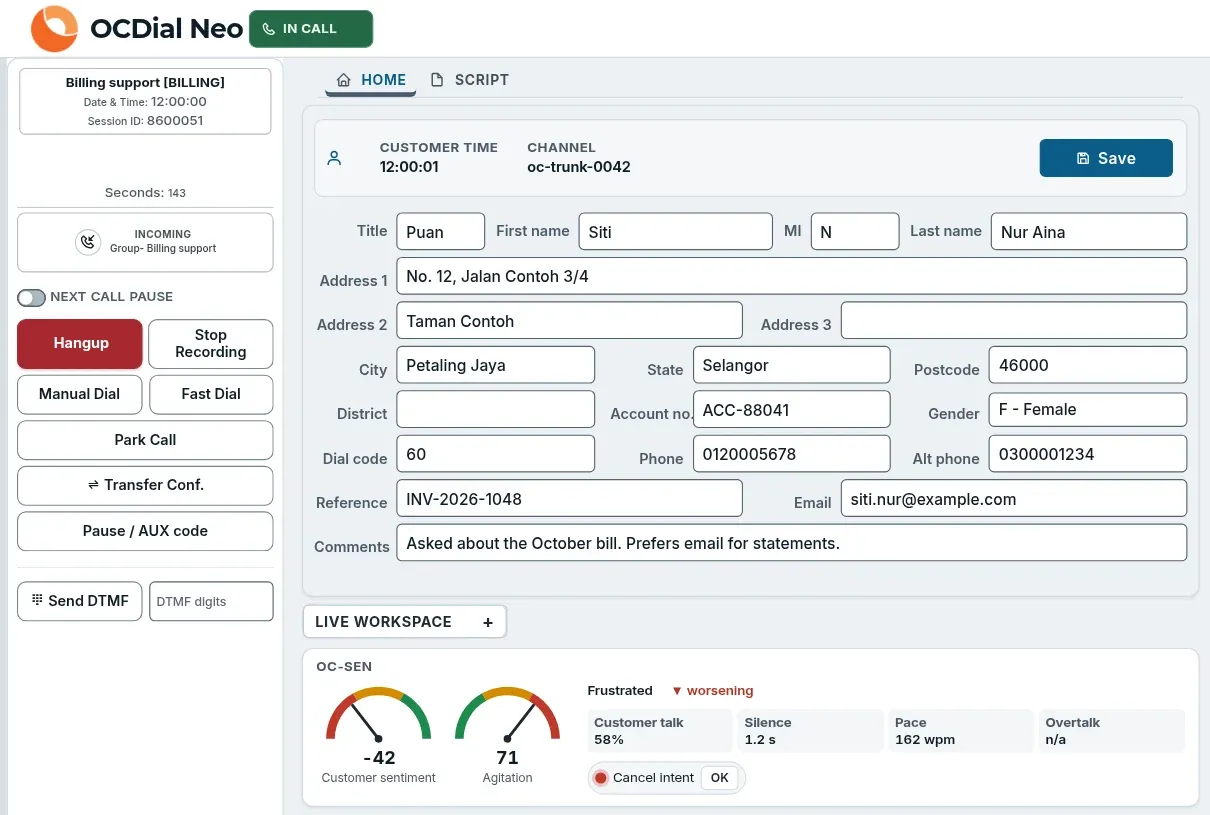
Real product screen with sample data.
Live on the call: what you see
- The OC-Sen strip sits under the customer record, so the agent sees it without leaving the call. It shows customer sentiment and agitation, the main emotion, whether the call is improving or worsening, and how much the customer talks, pauses and how fast.
- Watch items, such as intent to cancel, light a lamp when the AI is confident enough, by the threshold you set, and the agent acknowledges it on screen.
- When OC-Sen is on with agent visibility, the strip stays on screen and waits between calls. It reads only the customer's side of the call, and detected personal data is redacted from the transcript before scoring.
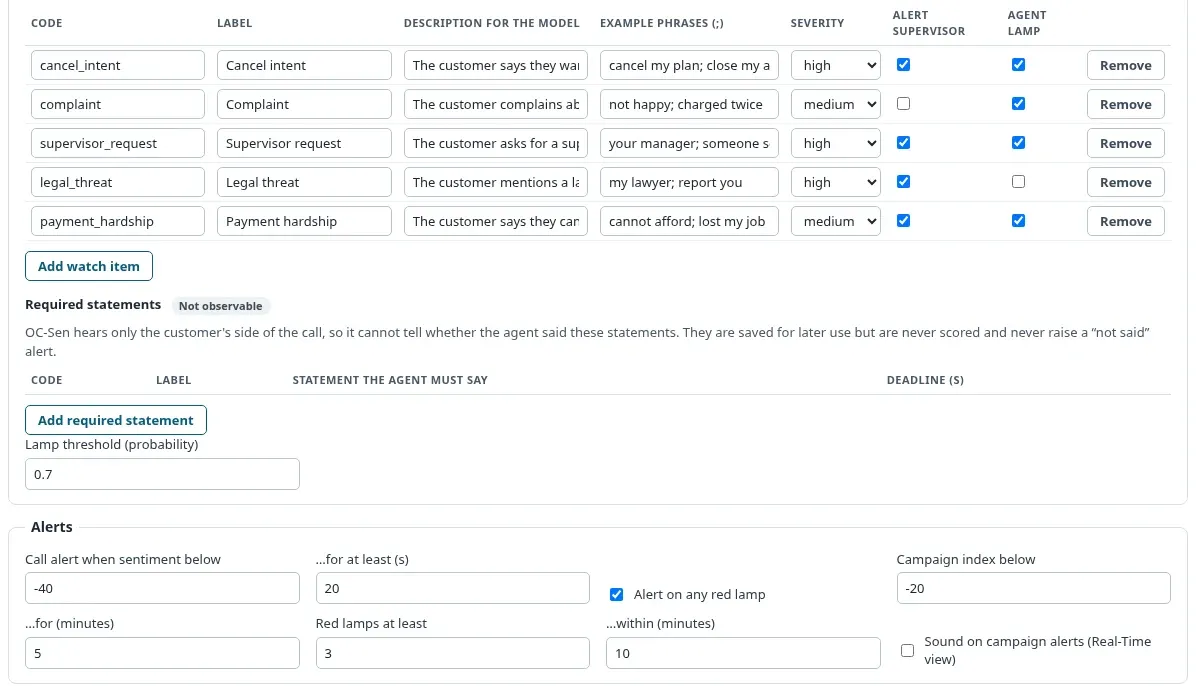
Real product screen with sample data.
Campaign settings: what you see
- Each campaign has its own watch items. Cancel intent, complaints, supervisor requests and legal threats are ready to use, and you can add your own, such as payment hardship, with example phrases.
- For each item, choose the severity, whether a supervisor is alerted and whether the agent sees a lamp.
- Set when a call raises an alert, and when the whole campaign does: for example, when the live index stays below its threshold for five minutes, or three unacknowledged high-severity alerts set to alert supervisors occur within ten. The product's “red lamp” means one of those high-severity alerts. Cost limits per call and per day keep spending in check.
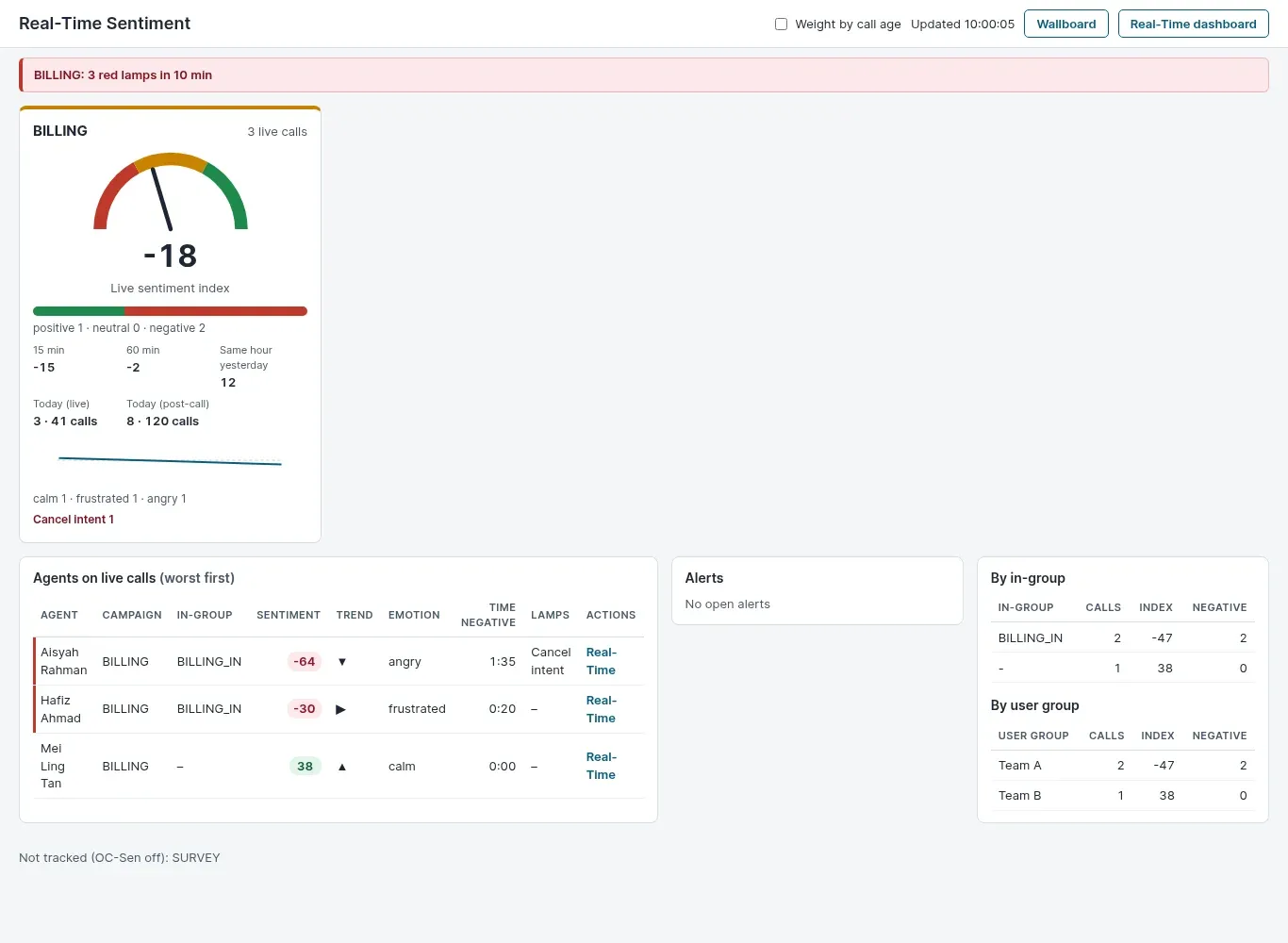
Real product screen with sample data.
Real-time sentiment view: what you see
- A live sentiment index for each campaign, with the last 15 and 60 minutes and the same hour yesterday beside it. It can also run as a wallboard.
- Agents on live calls are listed by sentiment, worst first, so supervisors know which call to look at.
- Alerts fire when sentiment stays low or a high-severity watch item set to alert supervisors goes unacknowledged. Supervisors open the real-time dashboard to listen in. Each campaign has cost limits per call and per day.
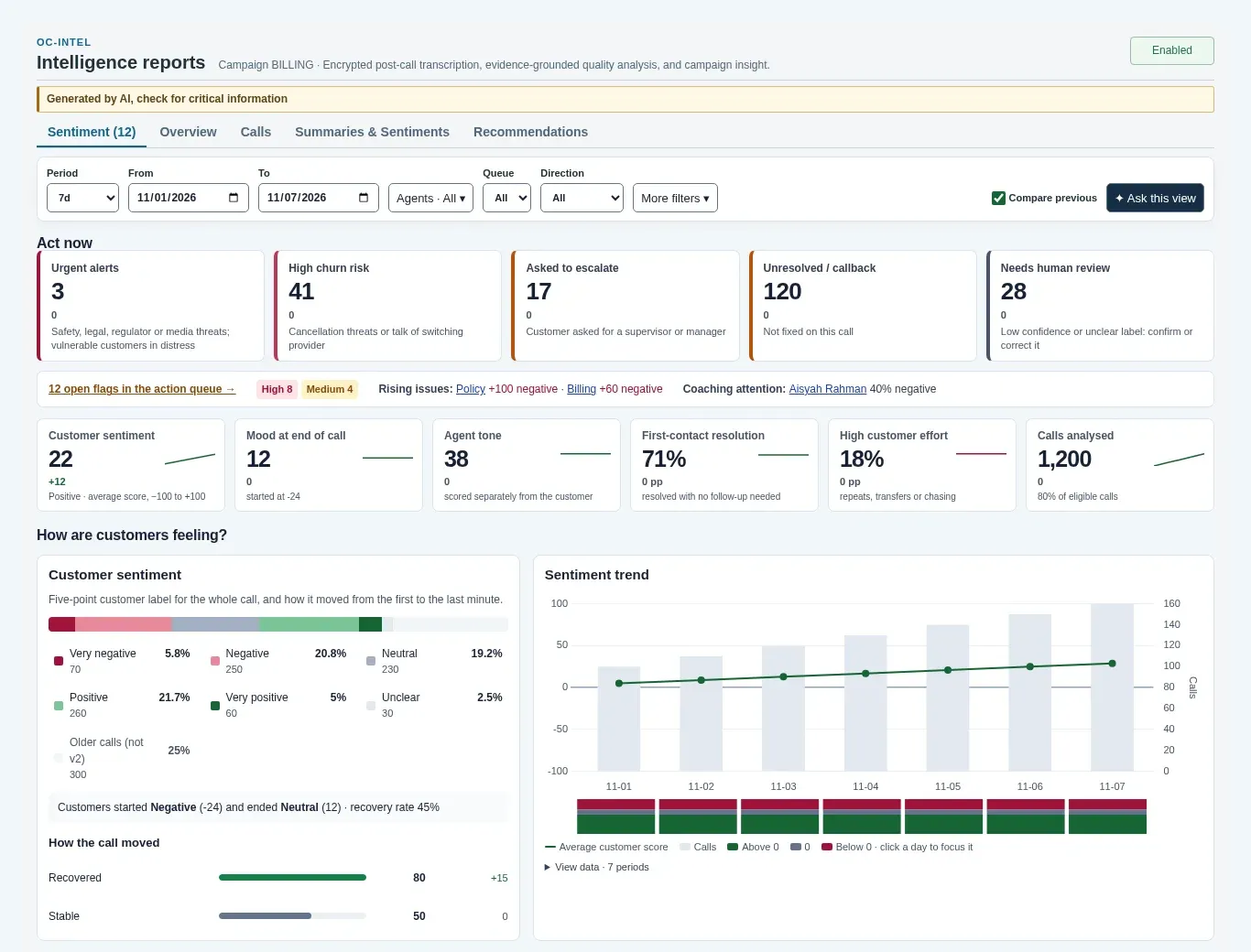
Real product screen with sample data.
Sentiment dashboard: what you see
- Act now tiles count urgent alerts, high churn risk, escalation requests, unresolved calls and calls that need human review.
- Available results for each analysed call include a five-point customer sentiment label, a separate agent tone score, first-contact resolution, customer effort and how the mood moved from start to end; any of them can be unclear or unavailable.
- Filter by date, agent, queue, emotion, topic or risk, compare with the previous period, and export to CSV.
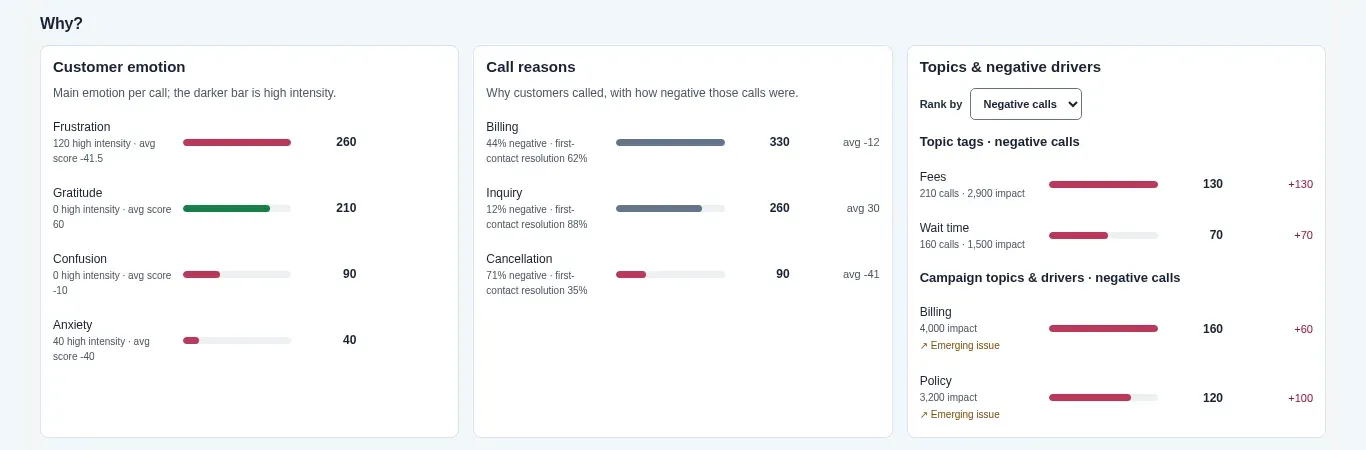
Real product screen with sample data.
Why customers feel that way: what you see
- See the main customer emotions, why customers called, and which topics drive negative calls. Compare with the previous period to flag topics with rising negative calls.
- Compare results by day, queue, agent or topic. You can also ask a question about the current view and get an answer from the view's totals and a selection of call excerpts, charged as an AI request within the campaign's daily limit.
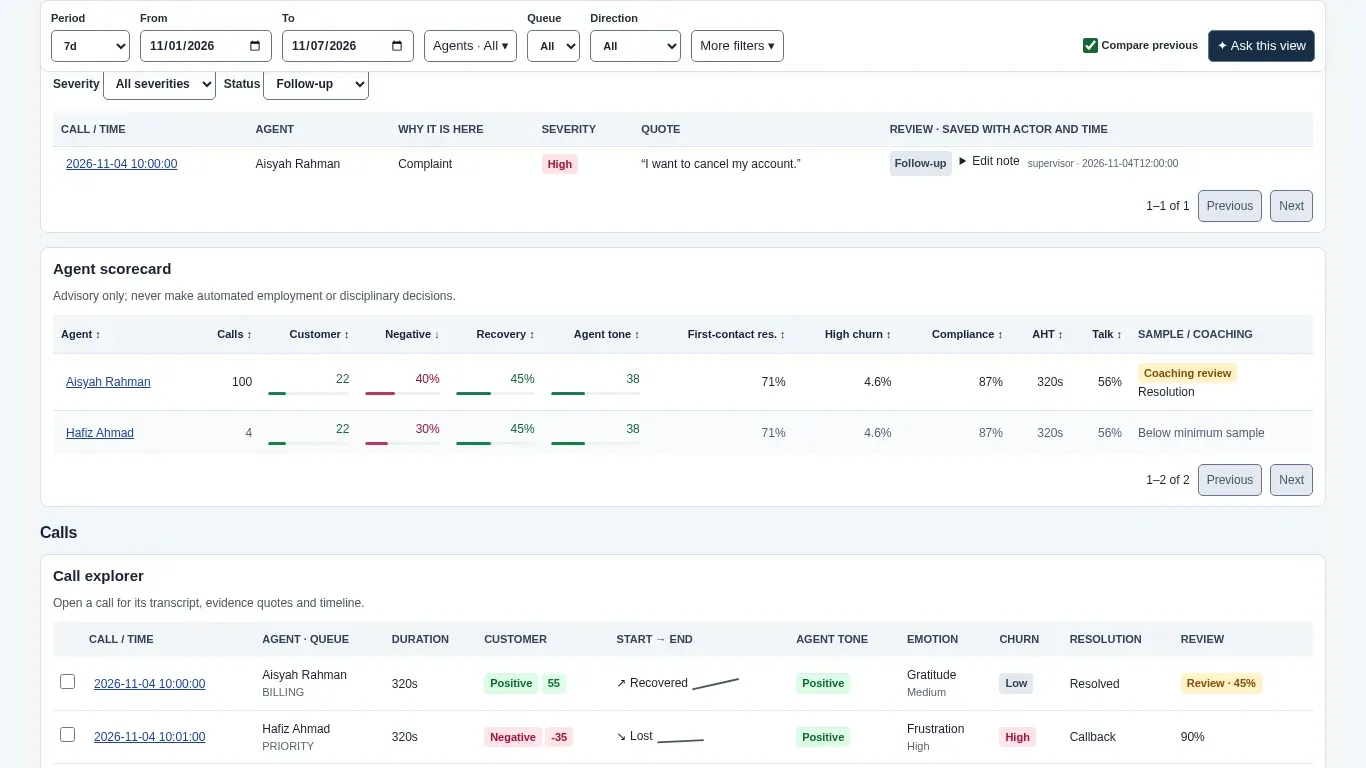
Real product screen with sample data.
Action queue and scorecards: what you see
- The action queue lists urgent alerts, churn threats, escalation requests, complaints and critical compliance misses, with the supporting quote where available.
- Agent scorecards show sentiment, recovery of negative calls, tone and compliance for coaching. They are advisory only, and not for automated employment or disciplinary decisions.
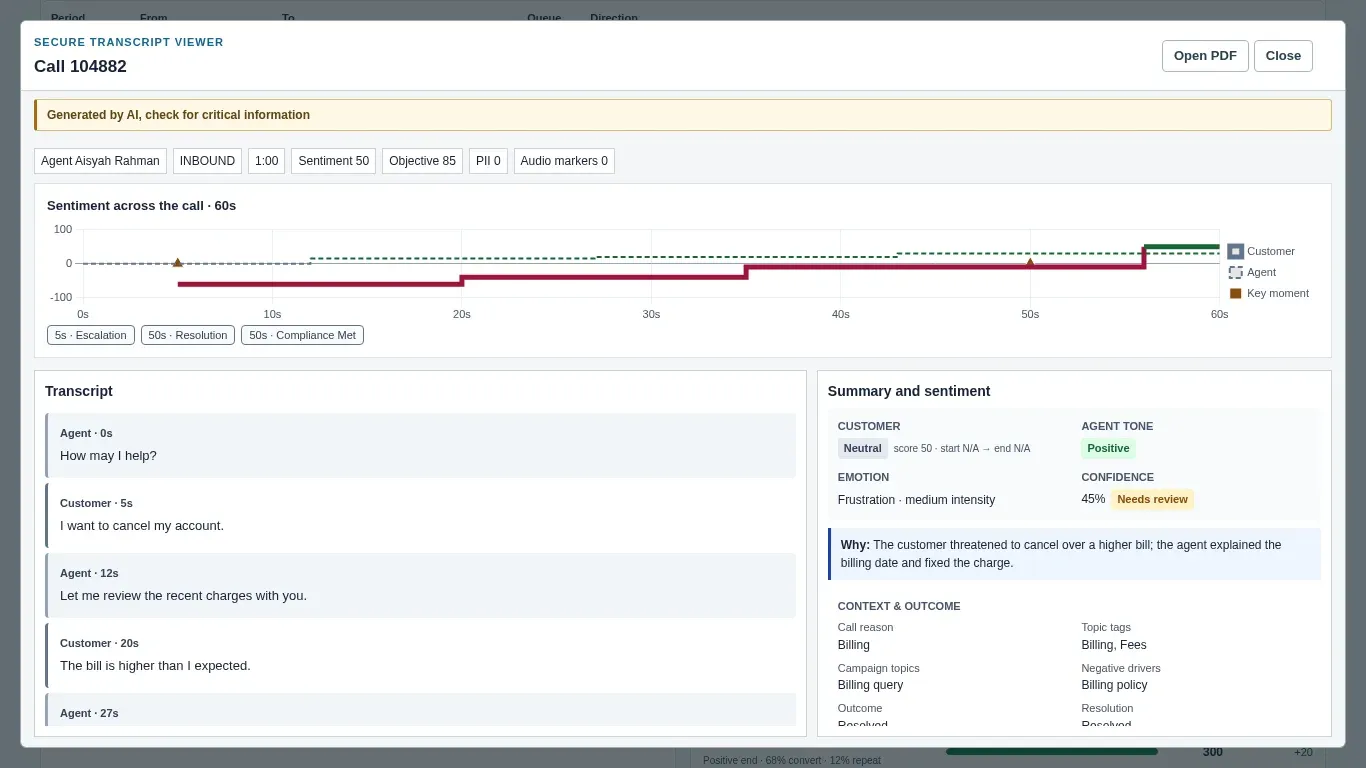
Real product screen with sample data.
Sentiment across a call: what you see
- A timeline shows customer and agent sentiment across the call, with key moments you can jump to next to the transcript.
- Supporting quotes are checked for a normalised match in the transcript. An unsupported risk is marked unclear or dropped, and unquoted sentiment or emotion labels get lower confidence. Calls with an unclear customer sentiment label, or a returned label with missing or low confidence, are flagged for human review. Supervisors with permission can correct the sentiment label, and the change is recorded.
AI built into every campaign
Turn on the AI tools each campaign needs, with its own settings and spending limits.
Ask us which AI tools fit your campaigns and how they are priced.
CoPilot: answers for agents during the call
CoPilot, our AI agent assist, follows what the customer says and suggests answers from your own campaign documents, so new agents sound like experienced ones. Agents can also type a question and copy the answer with one click.
Summaries and scores after the call
When post-call analysis is enabled, selected eligible recordings can receive a transcript, a short summary and scores for campaign objectives and compliance, plus customer sentiment on Platinum, subject to duration and usage limits. Supervisors can search calls, ask questions about a call and export it as a PDF.
Live translation between agent and caller
The agent and the caller can each speak their own language while AI translates both ways in real time. You choose the languages per campaign and can play a consent message to the caller first.
Campaign insights and coaching
Roll call summaries into a summary for any date range, and get suggested improvements for the campaign and coaching points for each agent.
Personal data protected
Detected names, phone numbers, MyKad numbers, card numbers and other personal data are redacted from transcript text before the AI analyses, searches or exports it. Redaction is on by default for every campaign, can be turned off per campaign, and if it is on but not working, analysis stops. Detection can miss information. Live transcription and translation use the call audio, and live sentiment scoring can also receive customer audio when enabled and supported; that option is on by default.
Help Angel for administrators
An AI help panel in the admin console answers setup questions from the product's own guides, and shows only what each administrator's permissions allow.
Spending under control
Set a daily call limit and a daily AI cost limit for each campaign, so there are no surprise bills.
Modern agent screen, reports and security
What changes for agents, supervisors and your IT team.
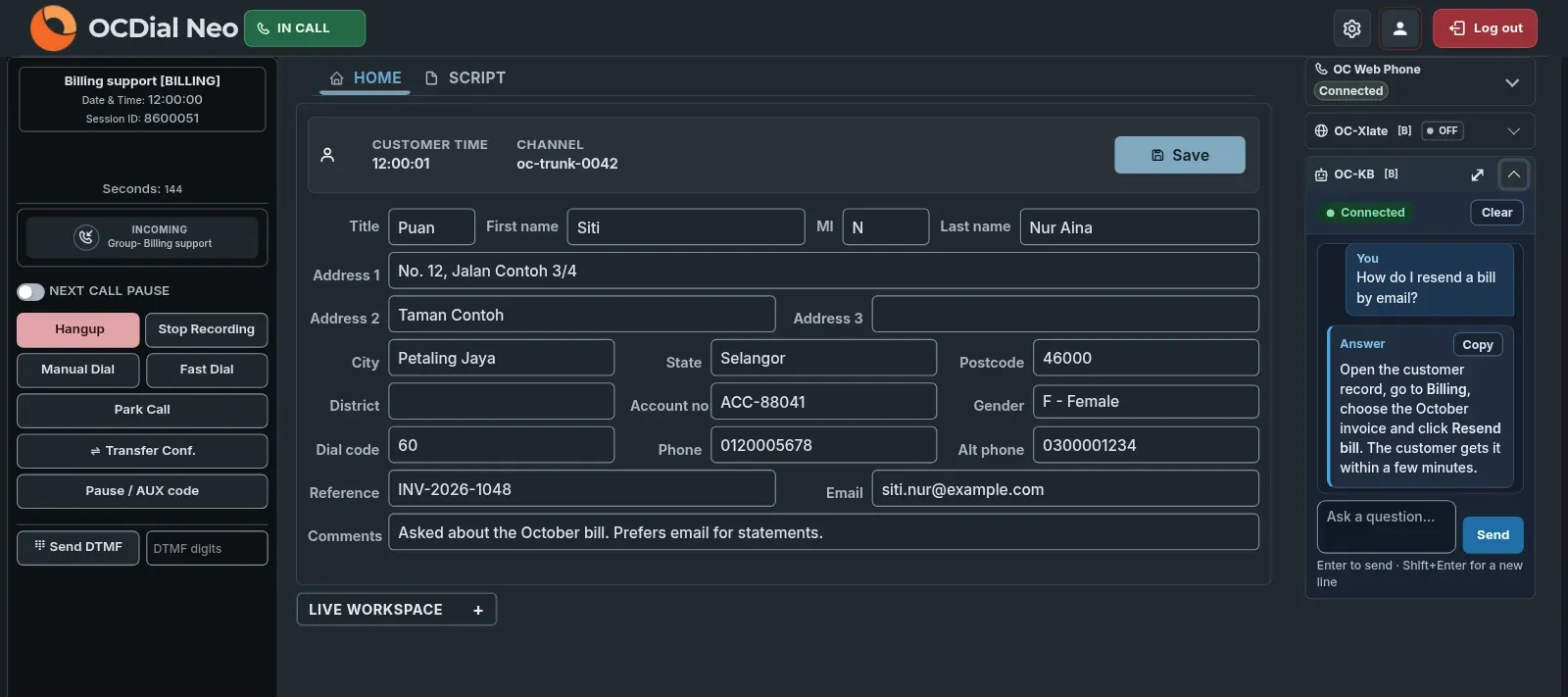
A modern agent screen with a built-in phone
Agents work in one clean screen, in light or dark mode, with the phone built into the browser. Desktop alerts and a choice of headset and ringing speaker mean no call is missed.
Telegram messages beside calls
Agents can answer Telegram messages, photos, files and voice notes in the same screen, with routing rules and limits per agent.
Reports that do not slow your calls
Modern reports with charts, forecasting, staffing (Erlang) and team performance run on a separate copy of the data. Large exports run in the background and are stored encrypted.
Encrypted recordings and single sign-on
Call recordings are encrypted with AES-256 and played through short-lived links. Staff sign in once with your company login, and a web application firewall protects the system.
Enterprise call center software, set up your way
Over 350 settings
Configure dialing, routing, wallboards and APIs to fit your process.
AI analytics
Post-call ratings and surveys, plus the AI Business Dashboard, with sentiment analysis on Platinum. Ask which AI tools can run on local servers; sentiment analysis uses a cloud AI service.
Agents work from anywhere
The web phone needs only a browser and a headset.
Hosted where you need it
Our Malaysian cloud, your own cloud or servers in your office.
Four ways to dial
Match the dialer to the campaign. Predictive keeps big teams busy, preview gives agents time to prepare, and manual dialling is always there.
- Who dials
- Calls per free agent
- Best for
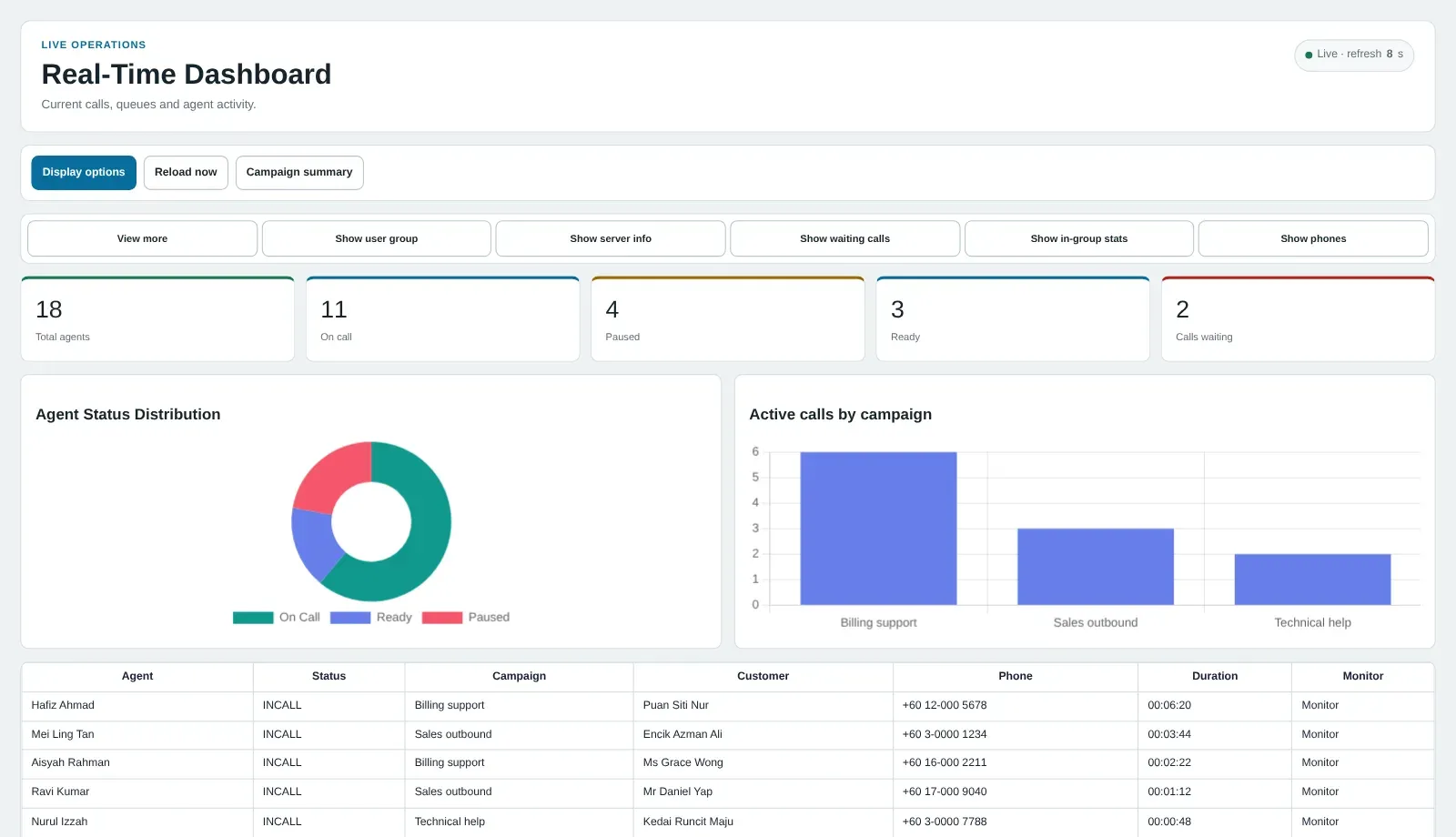
See your call center floor on a real-time dashboard
Your KPIs, your layout
Queues, service levels, abandon rates and agent states, per team or client. Real-time numbers on dashboards and wallboards show when to move agents between queues.
Act from the same screen
Reassign agents in one click. On Platinum, listen to live calls, coach agents or barge in.
Two plans, one platform
Prices checked November 2026. Gold RM 76 and Platinum RM 255 per agent per month; setup, customisation and optional 24/7 support are billed separately.
Gold
Inbound calls, recording and reports. From RM 76 per agent per month.
Automatic call distribution
Send calls to the right agent by wait time, availability and caller priority.
Web-based phone
Agents take calls in the browser with two lines each.
Call recording
Every call is recorded as compressed MP3 for quality and compliance.
Dashboards and wallboards
Real-time views for agents and supervisors.
Reports and API
Ready-made and custom reports, PDF and CSV exports, and a REST API.
Platinum
Everything in Gold, plus live call monitoring, outbound and automated campaigns.
Listen, coach and barge in
Supervisors listen to live calls, guide agents quietly or join the call.
Predictive and preview dialing
Agents handle only answered calls, or see the customer record first.
Blended campaigns
Agents take inbound and outbound calls in the same session.
Live and post-call sentiment analysis
Live gauges and alerts during the call, then a dashboard of sentiment, emotion, churn risk and first-contact resolution, with supporting quotes from the transcript.
Call scripts and callbacks
Scripts guide each call; scheduled callbacks remind agents of follow-ups.
CRM and other integrations
Agents see and update customer records in real time.
Multi-campaign, multi-tenant
Separate contact centers for departments or clients.
Security and audit
Two-factor sign-in, encryption at rest, recording masking and a full audit trail.
Start with a conversation
No contracts
Monthly or yearly plans. Add or remove agents as campaigns change.
Affordable
Built on proven open-source software that we customise and secure, so you save on licences.
Proven support
Experienced engineers, trusted by global contact centers.
Part of one platform
- CloudOfficeCloud PBX for the back office.
- OMNIWhatsApp, web chat and social messages in one inbox.
- ORENdeskHelpdesk and ticketing.
- WithTeamsCalls inside Microsoft Teams.
- Saloma AIAI voice agents that answer and make calls.
- SIP trunkingCalling and numbers for your own phone system.
What contact center customers say
From contact centres, IT teams and business owners who run on ORENCloud every day.
Not only is it extremely affordable, the quality of calls and support lived up to our expectations.
We started with 8 agents and redirected some of our numbers over to Orencloud’s contact center suite called Gold Package. Not only is it extremely affordable, the quality of calls and support lived up to our expectations. We quickly realized this is now the new norm, the way forward for this business activity within our staff and expanded the use to more than double ever since. We continue to use Orencloud’s services even up to this date.
 Malaysian Retirement Fund (EPF)Spokesperson
“Flexible and allow us to scale up or down easily according to our business needs.”
ORENcloud connectivity has proven to be reliable for our call centre business. Their subscription plans and system are also very flexible and allow us to scale up or down easily according to our business needs.
Au-YongHead of Contact Centre, Customer Connect (Malaysia) Sdn. Bhd. “Their system has functioned as an enabler to help us sustain 24x7x365 obligation to our customers.”
We developed a great partnership with ORENcloud and their dedication to our GSD telephony system is evident in all aspect of the solution. I highly appreciate their attention and after sales support in bringing our voice support platform online in such a short lead time since we had to begin working remotely due to the pandemic situation and their system has functioned as an enabler to help us sustain 24x7x365 obligation to our customers and our company.
 Amalan FrancisRegional IT Manager, Jotun Paints Asia Pacific
Questions customers ask
What is cloud contact center software, and what AI does it have?
Call center software in the cloud for inbound and outbound calls, with queues, dialers, recording, live monitoring, reports and integrations. Its AI features are post-call ratings and surveys, CoPilot AI agent assist, live call translation, the AI Business Dashboard, and Help Angel, an AI help panel for administrators. Platinum adds live and post-call sentiment analysis. Ask us which AI tools can run on local servers; sentiment analysis uses a cloud AI service. For AI voice agents that handle calls themselves, see Saloma AI.
How does sentiment analysis work on Platinum?
When enabled, OC-Sen uses live transcription to show gauges for customer sentiment and agitation, the main emotion, the trend and alerts, scored from the customer side of the call. Separately, OC-Intel analyses the recordings you select after the call. Available results include a five-point sentiment label, agent tone, emotion, churn risk, first-contact resolution and customer effort; any of them can be unclear or unavailable. Supporting quotes are checked for a normalised match in the transcript, unquoted labels get lower confidence, and calls with an unclear customer sentiment label, or a returned label with missing or low confidence, are flagged for human review. AI results can be wrong, so check critical information. See example use cases and settings.
What is a predictive dialer?
It dials a call list and passes only answered calls to free agents. Preview dialing shows the agent the customer record first. Both are in Platinum. See predictive dialer in Malaysia and the glossary.
What do agents see during a call?
ORENCloud Contact Center gives agents one browser screen with the customer record, call controls for hang up, recording, park, transfer and pause, and a built-in web phone. Platinum adds the call script in its own tab. Where you turn them on, CoPilot AI agent assist and live translation sit beside the call. After the call, the agent picks a call outcome. The screen works in light or dark mode.
How is personal data protected when the AI is used?
CoPilot redacts detected personal data such as names, MyKad numbers, phone numbers, email addresses and card numbers from text before it goes to the AI. For call analysis, search and PDF exports, the same redaction is on by default for every campaign and can be turned off per campaign; original transcripts stay encrypted, and analysis stops if redaction is on but not working. Detection can miss information. Live transcription and translation use the call audio, and live sentiment scoring can also receive customer audio when enabled and supported; that option is on by default.
Does the call center software integrate with a CRM and other software?
Yes. It connects to CRM systems and other tools, and has a REST API for custom integrations.
How much does it cost?
Gold is RM 76 per agent per month for inbound work. Platinum is RM 255 per agent per month and adds dialers and outbound tools. Setup, customisation and optional 24/7 support are billed separately; ask us about AI usage pricing. Prices checked November 2026. See contact center pricing.
Is it secure?
Yes. It uses encryption, multi-factor authentication, role-based access, recording masking and a full audit trail.


See it running with your own call flows
Tell us your team size and campaigns. We will set up a trial and price the right plan.