
Contact Centre solutions
Call centre sentiment analysis for Malaysian teams
Know which customers are upset while you can still help them, and why customers feel the way they do across every campaign.
Call centre sentiment analysis estimates how customers feel from what they say. When enabled, ORENCloud Contact Centre Platinum gives live gauges and alerts during the call and, when separately enabled, post-call analysis of selected eligible recordings: sentiment, emotion, churn risk and quotes where available. Results can be unclear or unavailable. Campaigns set coverage and spending limits. Platinum is RM 255 per agent a month; AI usage is quoted separately.
Prices checked November 2026. Excludes taxes, setup and optional 24x7 support.
Two layers: live on the call, and after it
OC-Sen helps the agent and supervisor during the call. OC-Intel explains what happened across the calls you select for analysis.
| Aspect | Live (OC-Sen) | After the call (OC-Intel) |
|---|---|---|
| When it runs | During the call, after a set amount of customer speech, when the customer pauses, or both | After the call, on the recordings you select for analysis |
| What it reads | The customer’s side of the live transcript, with detected personal data redacted | The whole call, both speakers, transcribed from the recording |
| What you get | Sentiment and agitation gauges, the main emotion, the trend, and lamps for watch items such as intent to cancel | Where the call supports it: a five-point sentiment label, agent tone, emotion, churn risk, first-contact resolution, customer effort and how the mood moved |
| Who sees it | Agents and supervisors, or supervisors only (your choice per campaign) | Supervisors and managers in OC-Intel reports |
| Evidence | A lamp lights when the AI’s confidence passes the threshold you set | Supporting quotes are checked for a normalised match in the transcript; unsupported risks are marked unclear or dropped, unquoted labels get lower confidence, and calls with an unclear customer sentiment label, or a returned label with missing or low confidence, are flagged for human review |
Call centre sentiment analysis, live and after the call
On Platinum, OC-Sen reads customer sentiment during the call, and OC-Intel explains it afterwards, with supporting quotes from the transcript. Real product screens; the names and numbers are made up.
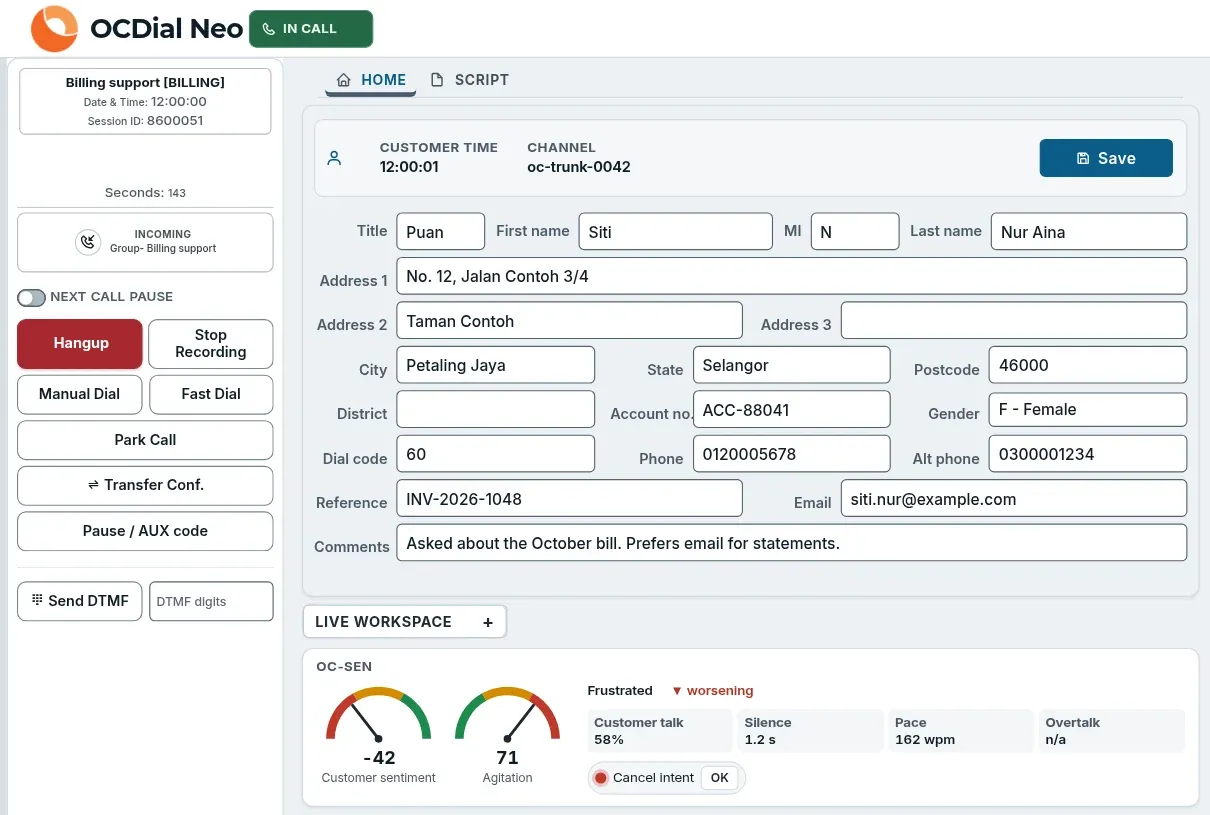
Real product screen with sample data.
Live on the call: what you see
- The OC-Sen strip sits under the customer record, so the agent sees it without leaving the call. It shows customer sentiment and agitation, the main emotion, whether the call is improving or worsening, and how much the customer talks, pauses and how fast.
- Watch items, such as intent to cancel, light a lamp when the AI is confident enough, by the threshold you set, and the agent acknowledges it on screen.
- When OC-Sen is on with agent visibility, the strip stays on screen and waits between calls. It reads only the customer's side of the call, and detected personal data is redacted from the transcript before scoring.
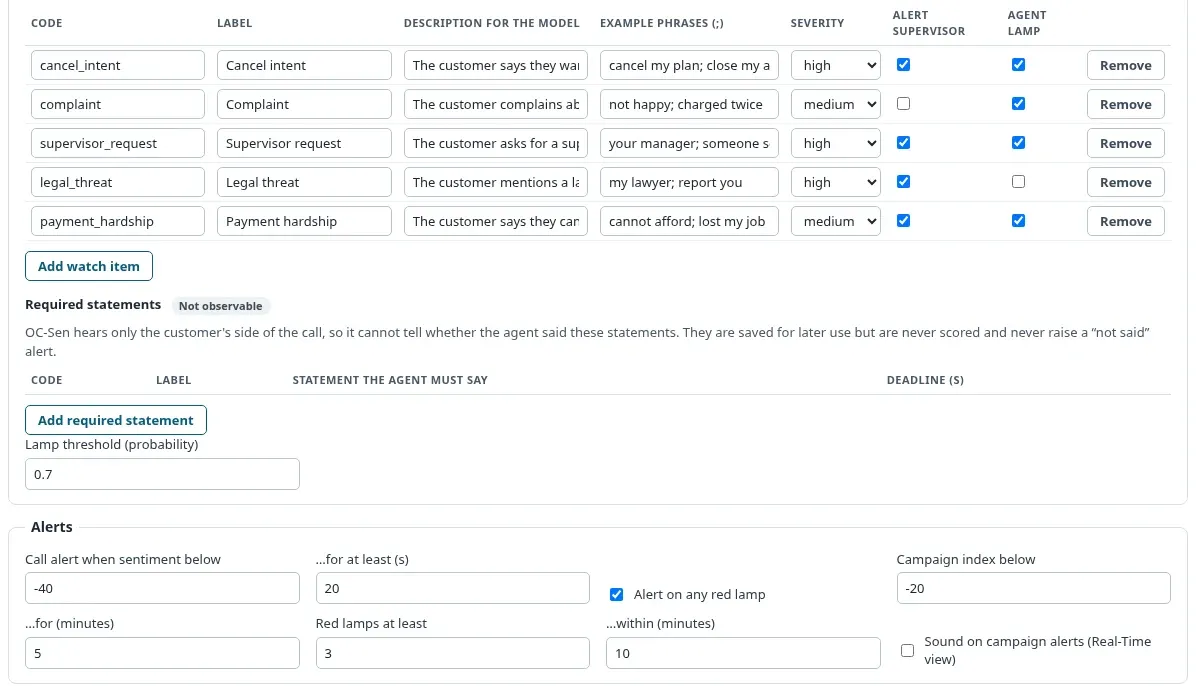
Real product screen with sample data.
Campaign settings: what you see
- Each campaign has its own watch items. Cancel intent, complaints, supervisor requests and legal threats are ready to use, and you can add your own, such as payment hardship, with example phrases.
- For each item, choose the severity, whether a supervisor is alerted and whether the agent sees a lamp.
- Set when a call raises an alert, and when the whole campaign does: for example, when the live index stays below its threshold for five minutes, or three unacknowledged high-severity alerts set to alert supervisors occur within ten. The product's “red lamp” means one of those high-severity alerts. Cost limits per call and per day keep spending in check.
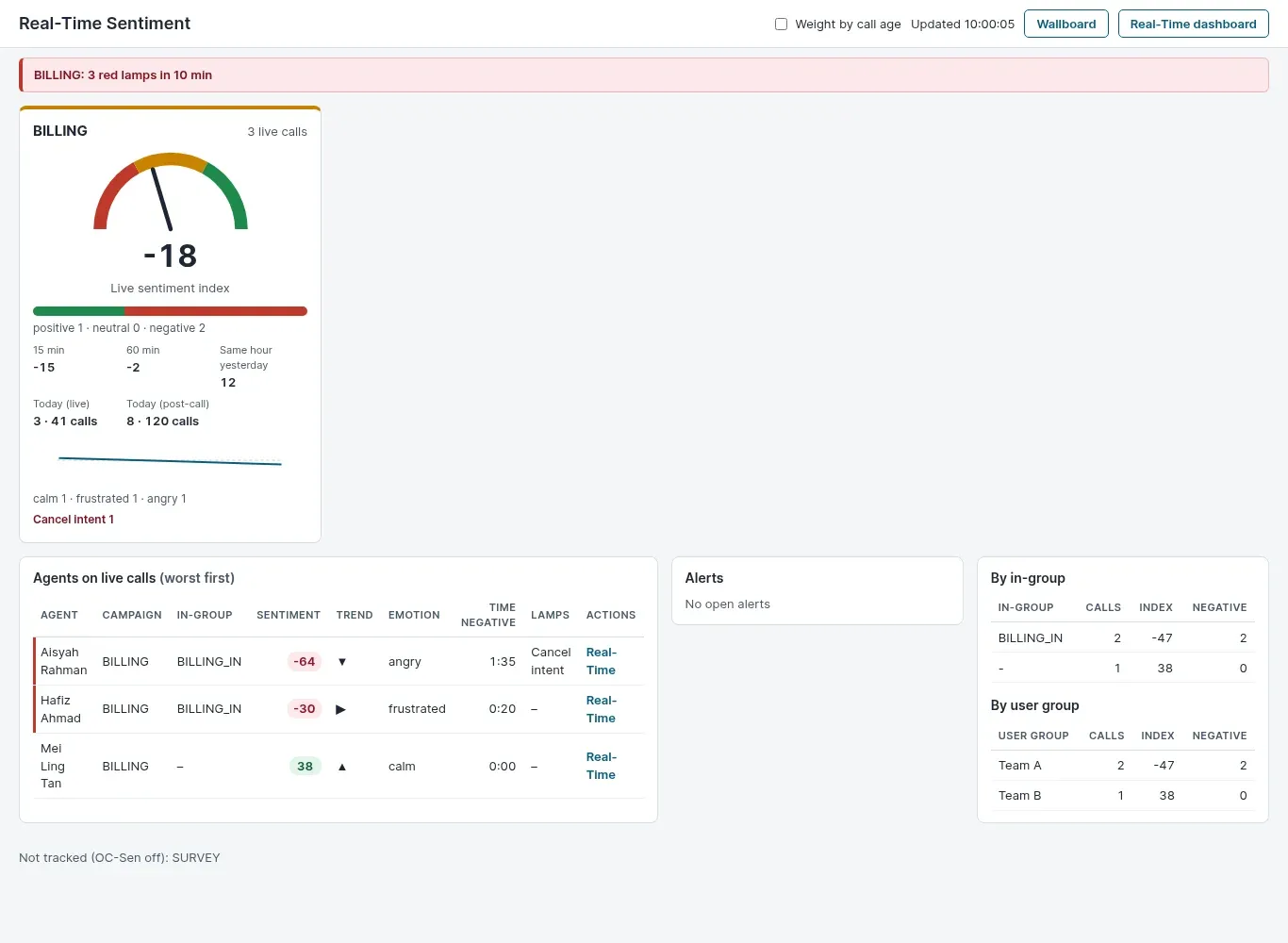
Real product screen with sample data.
Real-time sentiment view: what you see
- A live sentiment index for each campaign, with the last 15 and 60 minutes and the same hour yesterday beside it. It can also run as a wallboard.
- Agents on live calls are listed by sentiment, worst first, so supervisors know which call to look at.
- Alerts fire when sentiment stays low or a high-severity watch item set to alert supervisors goes unacknowledged. Supervisors open the real-time dashboard to listen in. Each campaign has cost limits per call and per day.
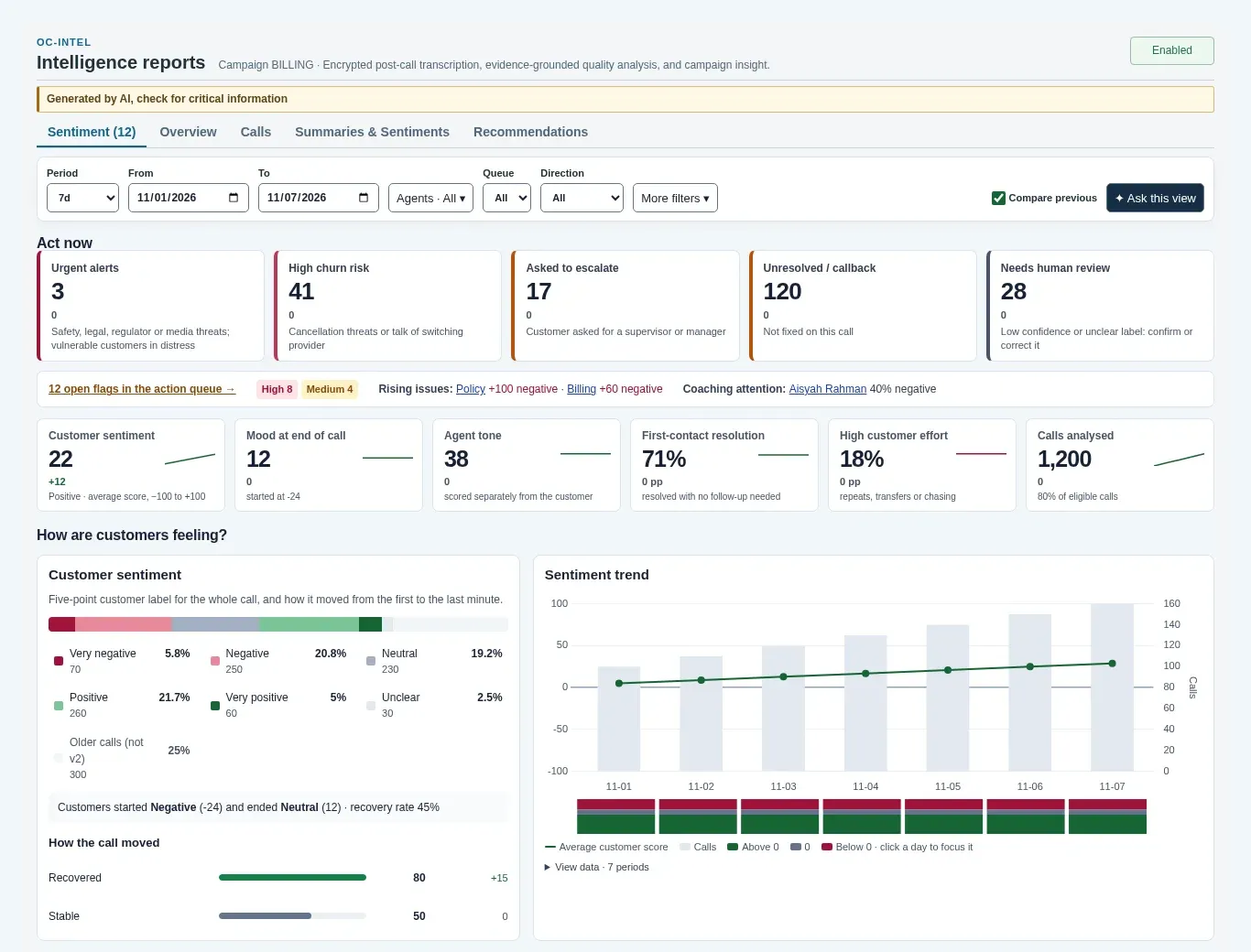
Real product screen with sample data.
Sentiment dashboard: what you see
- Act now tiles count urgent alerts, high churn risk, escalation requests, unresolved calls and calls that need human review.
- Available results for each analysed call include a five-point customer sentiment label, a separate agent tone score, first-contact resolution, customer effort and how the mood moved from start to end; any of them can be unclear or unavailable.
- Filter by date, agent, queue, emotion, topic or risk, compare with the previous period, and export to CSV.
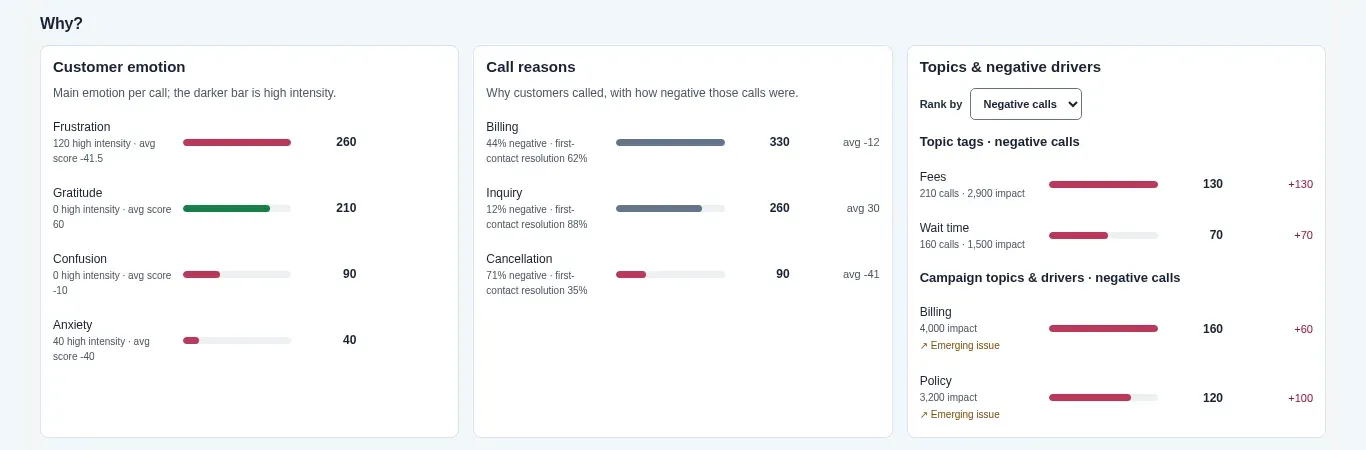
Real product screen with sample data.
Why customers feel that way: what you see
- See the main customer emotions, why customers called, and which topics drive negative calls. Compare with the previous period to flag topics with rising negative calls.
- Compare results by day, queue, agent or topic. You can also ask a question about the current view and get an answer from the view's totals and a selection of call excerpts, charged as an AI request within the campaign's daily limit.
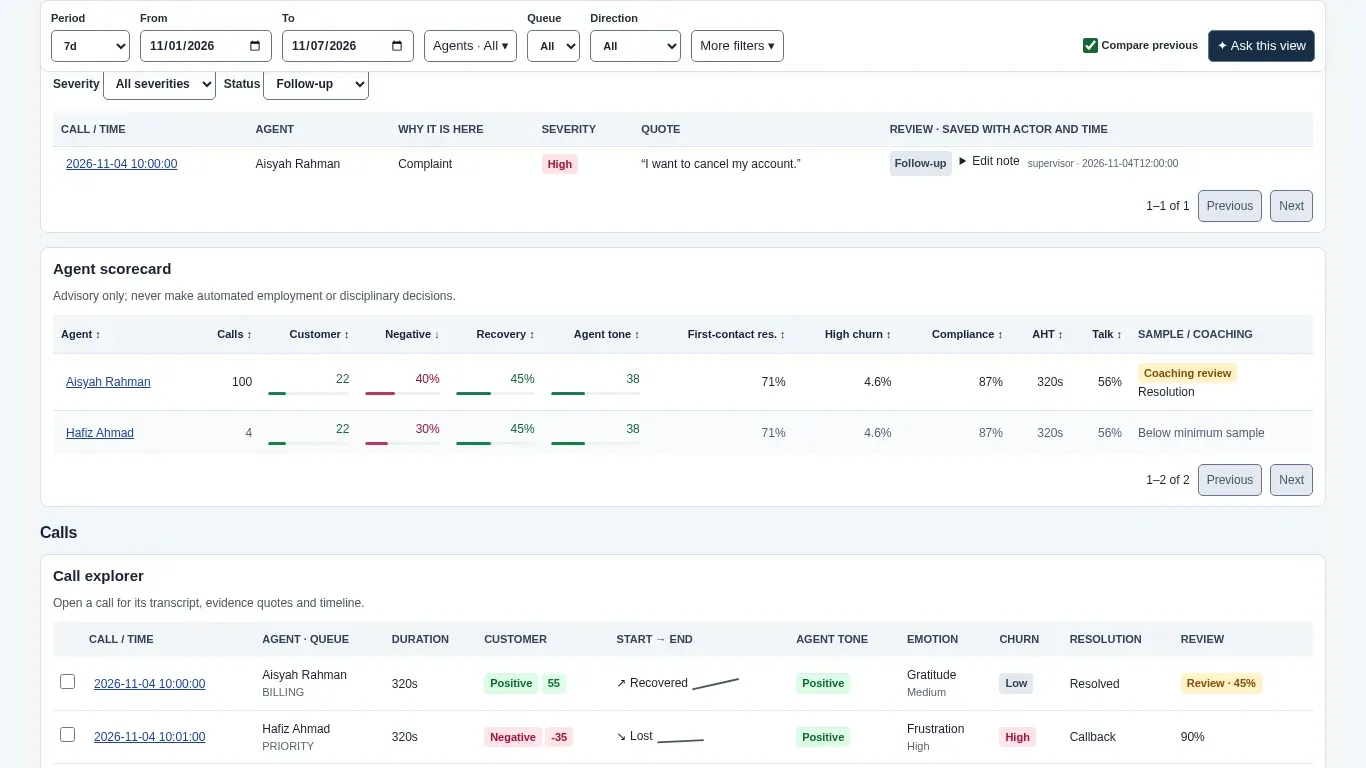
Real product screen with sample data.
Action queue and scorecards: what you see
- The action queue lists urgent alerts, churn threats, escalation requests, complaints and critical compliance misses, with the supporting quote where available.
- Agent scorecards show sentiment, recovery of negative calls, tone and compliance for coaching. They are advisory only, and not for automated employment or disciplinary decisions.
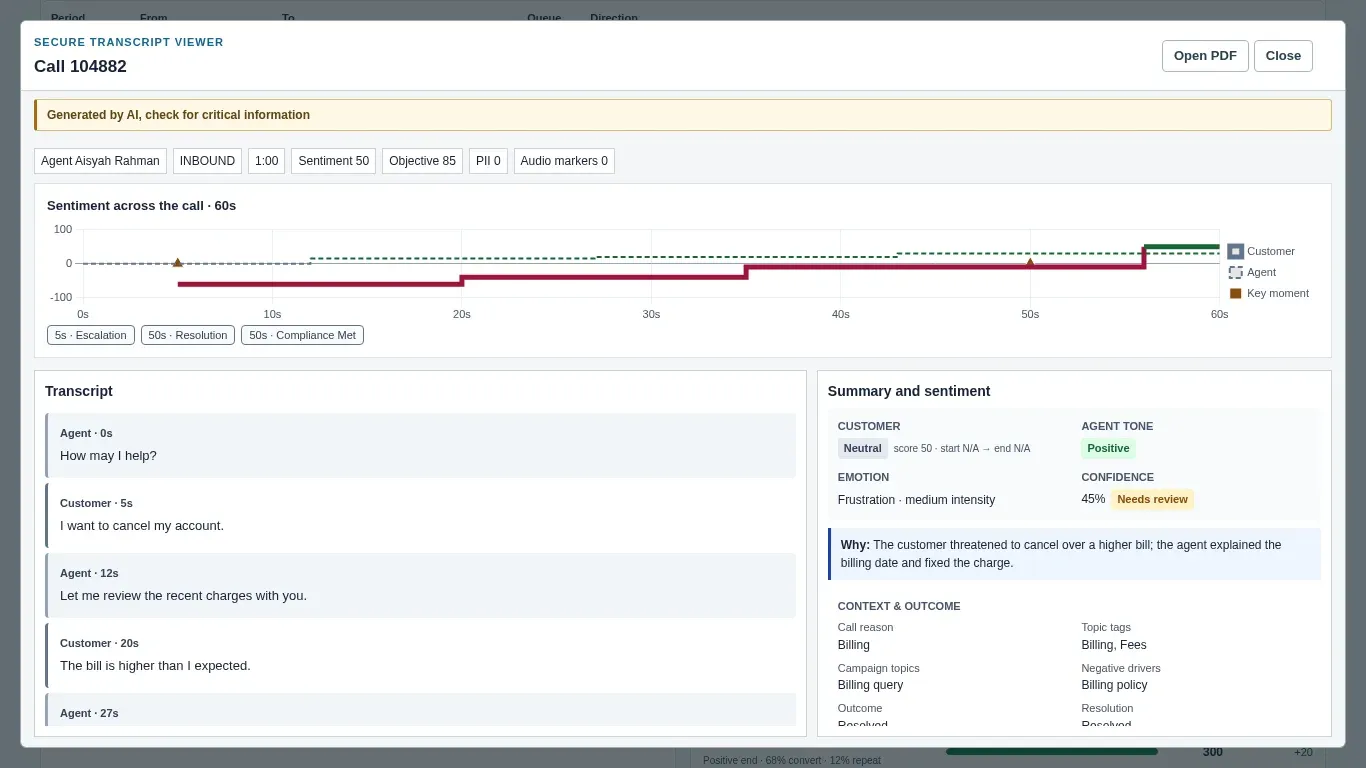
Real product screen with sample data.
Sentiment across a call: what you see
- A timeline shows customer and agent sentiment across the call, with key moments you can jump to next to the transcript.
- Supporting quotes are checked for a normalised match in the transcript. An unsupported risk is marked unclear or dropped, and unquoted sentiment or emotion labels get lower confidence. Calls with an unclear customer sentiment label, or a returned label with missing or low confidence, are flagged for human review. Supervisors with permission can correct the sentiment label, and the change is recorded.
Example use cases
How a contact centre team can put sentiment analysis to work. These are examples of the features in use, not results from a named customer.
Saving customers who want to leave
A customer says “I want to cancel my plan”. The cancel intent lamp can light on the agent’s screen and alert the supervisor, who finds the call in the real-time sentiment view and opens the real-time dashboard to listen in or coach the agent quietly. After the call, OC-Intel lists high churn-risk calls so the retention team can decide whom to call back.
Collections handled with care
Add your own watch item, such as payment hardship, with example phrases like “cannot afford” or “lost my job”. When it lights, the agent can switch to your hardship script. After the call, the action queue can flag customers who sound vulnerable or in distress, with the words that triggered the flag.
Spotting a service problem early
A billing run goes wrong and calls start turning negative. A campaign alert can fire when the live index stays below your threshold for several minutes, or when unacknowledged high-severity alerts set to alert supervisors reach the count you set, so the team lead can investigate while those calls are still in progress. Later, the “why” view shows billing as the topic driving negative calls, and you can ask “Why did sentiment drop on Tuesday?”
Complaints and escalations
Supervisor-request and legal-threat watch items can alert a supervisor during the call, and supervisors with permission can listen in from the real-time dashboard. On calls selected for post-call analysis, escalations and complaints can also appear in the action queue with the supporting quote where available, so they are followed up through your own procedure instead of being lost in a recording.
Coaching from real calls
Agent scorecards show sentiment, agent tone, compliance and how often each agent turns a negative call around. Ask “Which agents recover negative calls best?” to find calls worth using in training. Scorecards are advisory and are not meant for automated disciplinary decisions.
Feedback for product and policy teams
Call reasons, topics and negative drivers show what customers are unhappy about, and customer-effort estimates and repeat-contact indicators help you investigate where a process may be making people call again. Export the calls or the action queue as CSV for the team that owns the fix.
What you set for each campaign
Sentiment analysis is off until you turn it on, and each campaign has its own rules and spending limits.
Live scoring (OC-Sen)
- Turn live scoring on per campaign (live transcription must be on)
- Show it to agents and supervisors, or supervisors only
- Score after a set amount of customer speech, when the customer pauses, or both
- Watch items: cancel intent, complaints, supervisor requests and legal threats are ready to use; add your own with example phrases, severity and who is alerted
- Call alerts when sentiment stays below a level, or when a high-severity watch item set to alert supervisors is not acknowledged
- Campaign alerts when the live index stays below your threshold, or when unacknowledged high-severity alerts set to alert supervisors reach a count within a time window, with optional sound on the real-time view
- Cost limits per call and per day. Past a limit, AI scoring stops, and the voice measures (loudness, silence and pace), which need no AI request, carry on
Post-call analysis (OC-Intel)
- Analyse all eligible recordings, a percentage of them, or chosen calls
- Your own topic list and required compliance items, with critical items flagged
- Daily call and AI cost limits, and a retention period after which transcripts are deleted
- Filters by date, agent, queue, direction, emotion, topic and risk, with comparison to the previous period
- Ask a question about the current view; answers use the view’s totals and a selection of call excerpts. Viewing stored reports makes no extra AI request; each question is one, within the campaign’s daily limit
- Supervisors with permission correct the customer sentiment label in the call viewer; a model quality view shows how often the AI agrees with your reviewers
Built for Malaysian calls
Mixed languages
The post-call analysis records the languages spoken, such as English, Malay, Mandarin, Tamil or Manglish, and whether speakers switch between them. It is instructed not to treat particles such as “lah”, “meh” and “lor” as anger by themselves.
Personal data redacted first
Detected names, phone numbers, MyKad numbers, card numbers and other personal data are redacted from transcript text before live scoring. Post-call redaction is on by default and can be turned off per campaign. Live scoring can also receive customer audio when that option is on. Redaction can miss information, so set retention and access to match your policy. Post-call transcripts are encrypted and deleted after your retention period.
Hosting and AI processing
Ask about Malaysian-hosted, private-cloud and on-premises contact centre deployment. Sentiment analysis uses a cloud AI service. Live transcript text is redacted; post-call text redaction depends on the campaign setting. We confirm hosting and AI processing arrangements for your deployment. See the Contact Centre page.
Limits to know
Live scoring hears the customer only
It does not judge what the agent says during the call. Agent tone and required statements are checked after the call, from the full recording.
Live lamps are probabilities
A live lamp means the AI is confident enough, by the threshold you set, that something happened. The agent acknowledges it. If the call is selected for post-call analysis, OC-Intel analyses it again with supporting quotes.
AI can be wrong
Check critical information, use human review for low-confidence calls, and treat scorecards as coaching input only.
Plan eligibility
Sentiment analysis is part of the Platinum plan.
| Feature | Gold | Platinum |
|---|---|---|
| Price per agent a month | RM 76 | RM 255 |
| Live sentiment gauges and alerts | No | Yes |
| Sentiment dashboard, churn risk and evidence quotes | No | Yes |
| Listen, coach and barge in | No | Yes |
Prices checked November 2026. Excludes taxes; setup, customisation and optional 24/7 support are billed separately. Full plan comparison.
Related
Cloud Contact Centre
Queues, dialers, recording, wallboards, CoPilot agent assist and live translation.
Predictive dialer guide
Which dialling mode suits which outbound campaign.
Saloma AI
AI voice agents that answer and make calls themselves.
Sentiment analysis questions
What is call centre sentiment analysis?
Software that estimates how a customer feels during a call, such as positive, neutral or negative, and often the emotion behind it. Contact centres use it to find unhappy customers, spot problems and coach agents without listening to every recording.
Does ORENCloud analyse sentiment live or after the call?
Both, on the Platinum plan. OC-Sen scores the customer’s side of the live transcript during the call and shows gauges, emotion, trend and alert lamps. When post-call analysis is enabled, OC-Intel analyses selected eligible recordings afterwards, within duration and usage limits. Results can include a five-point label, agent tone, churn risk, first-contact resolution and quotes from the transcript, and can be unclear or unavailable.
Can it handle Malay, Manglish and mixed-language calls?
The post-call analysis records the languages spoken, for example English, Malay, Mandarin, Tamil or Manglish, and whether speakers switch between them. It is instructed to judge politeness and sarcasm by the speakers’ own norms, and not to treat particles such as “lah” as anger by themselves. Live scoring reads the live transcript, so ask us about the languages your campaigns use.
Which plan includes sentiment analysis?
Contact Centre Platinum, at RM 255 per agent a month. Gold, from RM 76 per agent a month, is built for inbound and does not include sentiment analysis. Prices exclude taxes; setup, customisation and optional 24/7 support are billed separately. Ask us how AI usage is priced for your campaigns. See Contact Centre pricing.
What happens to customers’ personal data?
Detected personal data, such as names, phone numbers, MyKad numbers and card numbers, is redacted from transcript text before live scoring, and post-call redaction is on by default for each campaign. Redaction can miss information. Transcription needs the call audio, and live scoring can also receive customer audio when the audio option is on (it is by default) and the AI service supports it. Post-call transcripts are stored encrypted and deleted after the retention period you set; call recordings follow your recording policy.
How accurate is it?
AI can be wrong, so the system is built to show its working. After the call, supporting quotes are checked for a normalised match in the transcript, unsupported risks are marked unclear or dropped, and unquoted sentiment or emotion labels get lower confidence. Calls with an unclear customer sentiment label, or a returned label with missing or low confidence, are flagged for human review, and supervisors with permission can correct the label. A model quality view tracks how often the AI agrees with your reviewers. A matching quote does not guarantee the judgement is right.
Can it check that agents read the required statements?
After the call, yes: OC-Intel checks the required compliance items you set against the full transcript. Live scoring hears only the customer, so it does not check what the agent said during the call.
Can I use the results to discipline staff?
Agent scorecards are advisory. They are meant for coaching, not for automated employment or disciplinary decisions.
Product and pricing references
Feature descriptions checked against the product on 17 November 2026. External pages can change; follow the links for the current wording.
- ORENCloud: Contact Centre Features and plans (as published by ORENCloud).
- ORENCloud: Contact Centre pricing
See sentiment analysis on your own calls
Tell us your campaigns and languages. We will show you the live gauges, the dashboard and how AI usage is priced.