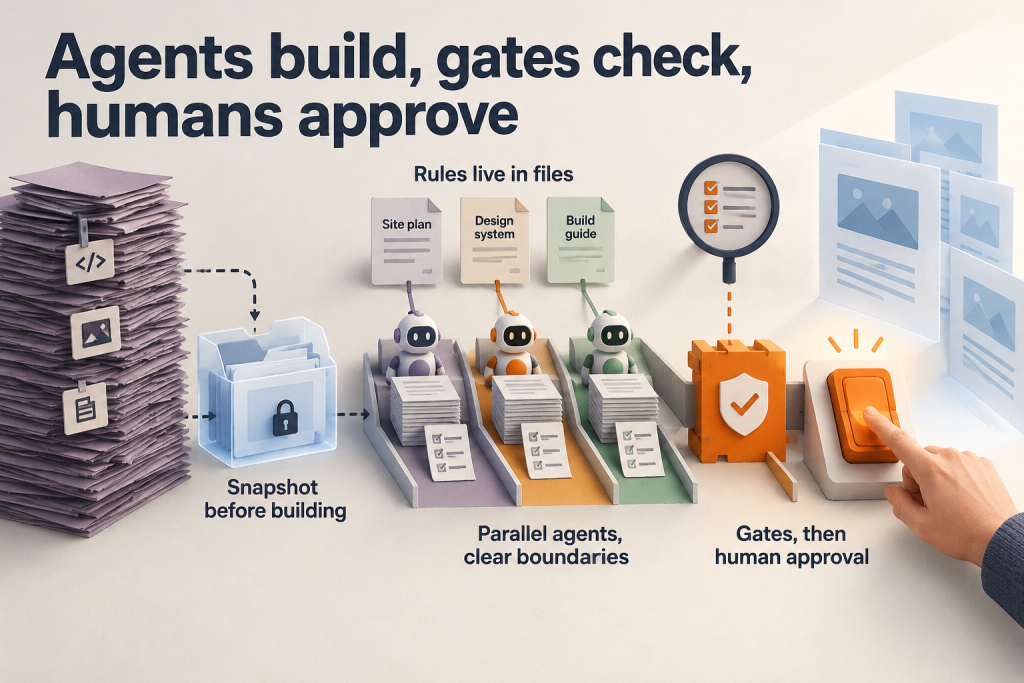
We moved our 44-page WordPress site to Astro on Cloudflare in about three days, and the person directing the work never wrote code. We gave goals, decisions and feedback to a coding agent, Claude Code. It read the old site, planned the rebuild, wrote and tested pages, and reported back. People kept control of business facts and final approval.
This article shares the ideas behind that rebuild, not a keystroke tutorial. If you want to migrate WordPress to Astro with a coding agent, these principles should give you enough of a frame to work out the details for your own site.
Why We Moved from WordPress to Astro and Cloudflare
Our WordPress and Elementor site had grown heavy. Separate plugins handled tables, redirects, SEO and cookies, and pages were slow. We wanted three things: fast static pages, one place to host everything, and an easy way to keep content current.
The stack maps to those goals. Astro outputs static HTML with small islands of interactivity. Cloudflare Workers serve the pages at the edge. D1, Cloudflare’s built-in database, holds what staff edit: prices, rates, numbers and FAQs.
The trade-off is that no plugin carries over. Every function a plugin performed has to be deliberately replaced, which is why planning comes before building.
Principle 1: State the Goal in Plain Words
We started with one message describing the finished outcome: read the old site, rebuild it as real separate pages, rewrite the copy in simple business English, keep what the plugins did, and host on Cloudflare. The agent asked questions only where the answer changed the build.
A clear goal gives the agent one target. Later decisions can be checked against it instead of being negotiated piece by piece.
Principle 2: Read Everything First, Then Work from a Snapshot
The agent read the public pages and the WordPress API first, then used read-only server access for what pages hide: plugins, form recipients, redirect rules and analytics. It turned that dump into clean Markdown and JSON files.
The idea is separation. Because later work used the snapshot, it never touched the live site. Read-only access added a second layer of protection while hidden configuration was gathered.
Principle 3: Rules Live in Files, Not Chat
Before building, three short guides were written:
- Site plan: a new URL for every old URL, and a replacement for every plugin.
- Design system: the shared visual rules.
- Build guide: rules for any agent that builds a page.
Instructions given in conversation fade when a session ends. Rules stored in files can be reread at any time, so every session and every agent applies them the same way.
Principle 4: Build One Reference Page Before Anything Else
The agent made the layout, header, footer and home page first. We fixed them using phone and desktop screenshots, and later pages copied that look.
A problem caught on the reference is fixed once. Missed, it repeats on every page built afterward. Visuals followed the same written-down approach: AI-generated cut-out photos came from prompt files with one shared style, plus interactive SVG diagrams and quiet animation that respects reduced-motion settings. Our write-up does not name the image tool used.
Principle 5: Fan Out in Parallel, with Clear Boundaries
Several agents then built page groups at the same time. Each had its own files, its own checklist and a report to hand back.
Separate files keep agents from overwriting each other. Checklists and reports make progress reviewable. We have not documented how many agents ran at once or how groups were divided, so that is yours to decide.
Principle 6: Use an Independent Auditor
A different model reviewed each round read-only. It checked facts against official sources and tried to break the security. Reports are saved in the repository alongside the code.
The limitation is real: these audit runs sometimes stall or hit capacity. Watch them and retry until they finish.
Principle 7: Turn Rules into Gates
One script fails the deploy on bad titles, duplicate descriptions, broken structured data or banned wording. Search, AI-answer and accessibility rules run the same way.
A rule that lives only in a document depends on someone remembering it. A gate checks every build. Redirects followed the same automation logic: a script turned the old URL list from the site plan into 301 redirects so no old link breaks. We have not published the script or its thresholds, so define your own.
Principle 8: Keep a Human Approval Step
One command applies database changes, builds, runs the gates and ships, but only when a person says so. Afterward the agent checks the live site, not only the local build, because a page can pass locally and behave differently in production.
What the Agent Does and What People Decide
The agent reads, plans, writes, tests, screenshots and reports. It never decides business facts. When it did not know something, it asked or left it out. People decided prices, claims and wording.
This boundary matters because an agent can produce plausible but wrong statements. Keeping facts with people, plus approval before deploys, limits that risk.
How We Run the Site Now
We run it with no developers:
- Admin edits: staff edit prices, rates and FAQs in an admin screen.
- Agent requests: anything else goes into a request queue or straight to the agent, such as “make these labels quieter.” The agent finds every copy of that fact, changes it from one source, runs the checks and deploys when we say so.
- Blog posts: new posts appear on the site automatically.
Lessons, Limitations and Next Steps
What we learned:
- Write the rules down once; the agent follows them every time.
- Look at real screenshots at phone width before saying “done.”
- Keep one source for each fact, and test it.
- Audit with a second AI, and supervise it.
- Keep a human approval step for production.
Our result was 45 static pages, mobile Lighthouse scores of 98 for performance and 100 for accessibility, best practices and SEO, and updates that take minutes. These are self-reported figures from one site, not independent measurement or a guarantee.
Our account does not cover costs, failure cases or how the approach scales to much larger sites. If you try it, a sensible starting point is the same one we used: snapshot your site and write the guides before building anything.